
In-App Protection Shielder for Apple
In-App Protection Shielder for Apple is a command-line tool that adds protection to iOS applications after they are built. No source code changes are required, and the protection starts automatically when the application launches.
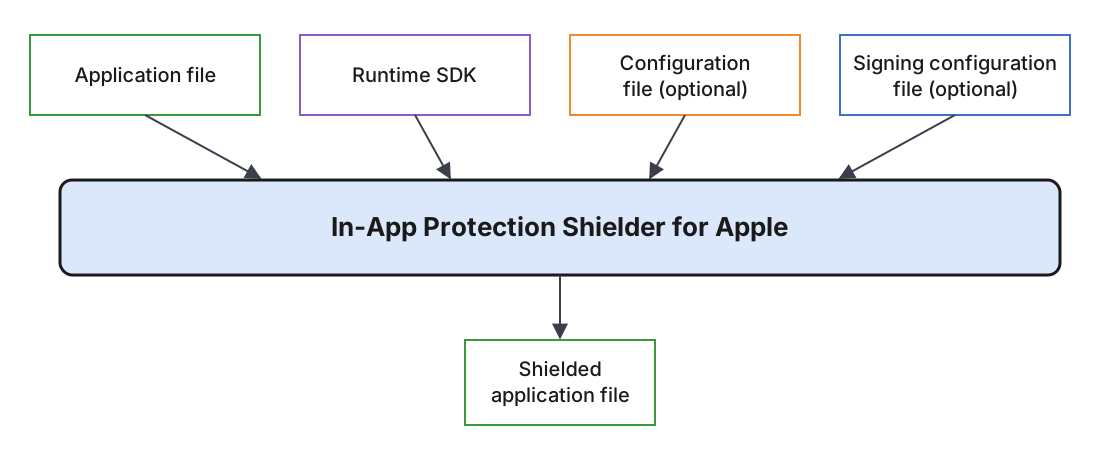
The Shielder processes application builds in .ipa and .app formats. The features are configured in an optional YAML configuration file. The output is a shielded .ipa file.
Overview of the Shielding Process
Supported Features
In-App Protection Shielder for Apple currently supports the following features:
Read Next
Installation
In-App Protection Shielder for Apple is distributed in a private artifact repository as a package with the following components of the same version:
iap-shielder, the command-line tool,IAPShielderRuntime.xcframework, the runtime SDK that the Shielder adds to the application,iap-shielder-artifact-manifest.json, a metadata file required by the Shielder.
The manifest has to stay in the same folder as IAPShielderRuntime.xcframework.
In-App Protection Shielder for Apple requires macOS 13 or later.
Shielded applications support iOS 15 and later.
Personalized Configuration Required.
In order to use In-App Protection Shielder for Apple, you need a custom configuration and access credentials for the artifact repository. Contact your sales representative or technical consultant to obtain the necessary prerequisites.
To verify the installation, run:
iap-shielder --version
Read Next
Usage
In-App Protection Shielder for Apple is a command-line tool. It requires:
- an iOS application to be shielded (
.ipaor.app), - the runtime SDK (
IAPShielderRuntime.xcframework).
Optionally:
- a configuration YAML file (without it, all features are enabled),
- a signing configuration YAML file.
The output of the Shielder is a shielded .ipa file. If the output file already exists, it is overwritten. The input application is not modified. The Shielder exits with a non-zero exit code when processing fails.
The Shielder modifies the application, so the original signature is no longer valid. The shielded application has to be signed, either by the Shielder or afterwards. See Signing.
Applications downloaded from the App Store are encrypted and cannot be shielded. Use the build exported from Xcode or your build system.
Running the Shielder
iap-shielder protect [OPTIONS] <input-application>
Adding --dry-run validates the configuration and prints the shielding plan without writing any output.
Example
iap-shielder protect \
  --config config.yml \
  --signing-config signing.yml \
  --output App-shielded.ipa \
  App.ipa
Shielding without signing, for signing afterwards:
iap-shielder protect \
  --config config.yml \
  --defer-signing \
  --output App-shielded.ipa \
  App.ipa
where:
App.ipa- input application,config.yml- configuration file, including the path to the runtime SDK, see Configuration,signing.yml- signing configuration file, see Signing,App-shielded.ipa- shielded output application. It must be different from the input file.
App Store Privacy Manifest
The runtime SDK contains its own privacy manifest (PrivacyInfo.xcprivacy), which is added to the shielded application together with the runtime SDK. Your application’s privacy manifest does not need any changes.
The runtime SDK does not track users and does not collect any data. It declares the following required reason APIs:
| API Category | Reason |
|---|---|
NSPrivacyAccessedAPICategorySystemBootTime |
35F9.1 |
NSPrivacyAccessedAPICategoryFileTimestamp |
C617.1 |
Read Next
Command Line Options
In-App Protection Shielder for Apple supports the following command-line options:
iap-shielder protect [OPTIONS] <input-application>
Options on the command line override the same values in the configuration files.
Required Options
| Option | Description |
|---|---|
--output <path>, -o |
Output file with the shielded application. Must be different from the input file. Not required with --dry-run. |
--runtime <path> |
Path to IAPShielderRuntime.xcframework, with iap-shielder-artifact-manifest.json in the same folder. Not required if set as runtime.artifact in the configuration file. |
Optional Options
| Option | Description |
|---|---|
--config <config.yml> |
Configuration file. See Configuration. |
--signing-config <signing.yml> |
Signing configuration file. See Signing. |
--defer-signing |
Shields the application without signing it. The output has to be signed before installation. |
--expected-team-id <team-id> |
Apple Team ID the application is signed with. Required for Repackaging Detection with deferred signing. |
--trusted-certificate-sha256 <hash> |
SHA-256 hash of a trusted signing certificate. Repeat for each certificate. Replaces the list from the configuration file. |
--dry-run |
Validates the inputs and prints the shielding plan. Writes no output. |
--version |
Prints the version. |
-h, --help |
Prints help. |
Signing Options
These options are used only when the Shielder signs the application. They are not allowed with --defer-signing.
| Option | Description |
|---|---|
--signing-identity <identity> |
SHA-1 hash (preferred) or name of the signing certificate in the keychain. Required unless set in the signing configuration file. |
--keychain <path> |
Keychain with the signing identity. |
--profile <path> |
Provisioning profile for the main application. |
--profile-for <bundle-id>=<path> |
Provisioning profile for one bundle ID, for example an app extension. Repeatable. |
--profiles-directory <path> |
Folder with provisioning profiles, matched to the application and its extensions automatically. |
--entitlements <path> |
Entitlements file for the main application. |
--entitlements-for <bundle-id>=<path> |
Entitlements file for one bundle ID. Repeatable. |
--remove-entitlement <bundle-id>:<key> |
Removes one entitlement. Repeatable. |
--[no-]synthesize-identifier-entitlements |
For unsigned input without an entitlements file, sets only the identifier entitlements. |
--[no-]require-explicit-app-id |
Rejects provisioning profiles with a wildcard App ID. Required for App Store distribution. |
Read Next
Configuration
In-App Protection Shielder for Apple reads an optional configuration file, set with --config. The configuration file uses the YAML data format. All features are enabled by default and terminate the application when they detect an issue.
General structure of the configuration:
schema_version: 1

runtime:
  artifact: <path>

defer_signing: true | false
expected_team_id: "<Team ID>"
trusted_certificate_sha256:
  - "<SHA-256 hash>"

rasp:
  <feature>:
    enabled: true | false
    response:
      action: terminate | no_action
      exit_url: <HTTPS URL>
Rules:
schema_version: 1is required.- Unknown keys are rejected.
- Booleans are lowercase
trueorfalse. - Hashes and Team IDs should be quoted.
- Paths are relative to the configuration file.
General Options
| Option | Description |
|---|---|
schema_version |
Required. Must be 1. |
runtime.artifact |
Path to IAPShielderRuntime.xcframework. Overridden by --runtime. |
defer_signing |
true shields the application without signing it. Defaults to false. See Signing. |
expected_team_id |
Apple Team ID the application is signed with. Required for repackaging detection with deferred signing. See Repackaging Detection. |
trusted_certificate_sha256 |
SHA-256 hashes of signing certificates used outside the App Store and TestFlight. See Repackaging Detection. |
RASP Options
| Option | Description |
|---|---|
rasp.<feature>.enabled |
Turns the feature on or off. Defaults to true. |
rasp.<feature>.response.action |
terminate (default) or no_action. See Recommended Responses. |
rasp.<feature>.response.exit_url |
HTTPS URL opened when the application is terminated. Only with terminate. |
RASP Features
| Feature | Description |
jailbreak |
Jailbreak Detection |
debugger |
Debugger Protection |
hooking |
Hooking Detection |
repackaging |
Repackaging Detection |
binary_integrity |
Binary Integrity Verification |
injection |
Injection Detection |
Complete Example
schema_version: 1

runtime:
  artifact: IAPShielderRuntime.xcframework

expected_team_id: "ABCDE12345"
trusted_certificate_sha256:
  - "<SHA-256 of the signing certificate>"

rasp:
  jailbreak:
    response:
      action: terminate
      exit_url: https://example.com/security/jailbreak
  debugger:
    response:
      action: no_action # for example, internal builds that need debugging
Read Next
Signing
In-App Protection Shielder for Apple modifies the application, so the application has to be signed after shielding. The Shielder can sign the application itself, or the application can be signed afterwards by the owner of the signing certificates.
Signing by the Shielder
The Shielder signs the application, its extensions, and the runtime SDK. The following are required:
- a signing identity in an unlocked keychain,
- a provisioning profile for the main application and for each app extension, from the same team as the signing identity.
Entitlements are taken from the original signature and can be adjusted with the entitlements options.
The signing inputs are set with the signing options or in a signing configuration file (--signing-config). Example:
schema_version: 1

signing:
  identity: "<SHA-1 of the signing certificate>"
  profiles:
    main: profiles/App.mobileprovision
    by_bundle_id:
      com.example.app.share: profiles/Share.mobileprovision
  require_explicit_app_id: true
| Option | Command Line Option |
|---|---|
signing.identity |
--signing-identity |
signing.keychain |
--keychain |
signing.profiles.main |
--profile |
signing.profiles.by_bundle_id |
--profile-for |
signing.profiles.directory |
--profiles-directory |
signing.entitlements.main |
--entitlements |
signing.entitlements.by_bundle_id |
--entitlements-for |
signing.entitlements.remove |
--remove-entitlement |
signing.synthesize_identifier_entitlements |
--[no-]synthesize-identifier-entitlements |
signing.require_explicit_app_id |
--[no-]require-explicit-app-id |
The signing identities and their SHA-1 hashes are listed by:
security find-identity -v -p codesigning
Signing After Shielding
With --defer-signing, the Shielder keeps the existing signatures and profiles. The input application has to be signed, and the shielded application has to be signed again before installation.
All components have to be signed with certificates of the same team, from the innermost to the outermost:
- frameworks and libraries in
Frameworks/, includingIAPShielderRuntime.framework, without entitlements, - app extensions in
PlugIns/and other nested bundles, such as App Clips or watch apps, each with its own provisioning profile, - the main application, with its provisioning profile.
App extensions, nested bundles and the main application keep the entitlements of the original signature, adjusted to their provisioning profiles. Each provisioning profile has to include the signing certificate.
Read Next
RASP Feature Overview
RASP (runtime application self-protection) features protect the application against several attack vectors.
Currently, In-App Protection Shielder for Apple covers the following problems:
- Jailbreak Detection
- Debugger Protection
- Hooking Detection
- Repackaging Detection
- Binary Integrity Verification
- Injection Detection
The protection starts automatically when the application launches and also covers its app extensions.
Configuration
RASP features are configured in the rasp section of the configuration file. Each feature is enabled by default and can be turned off with enabled: false. When a feature detects an issue, it responds with one of the following actions:
terminate(default): the application is terminated. Ifexit_urlis set, the URL is opened in the browser first.no_action: the application keeps running.
rasp:
  jailbreak:
    response:
      action: terminate
      exit_url: https://example.com/security/jailbreak
The exit URL is stored in the application and can be read by anyone. Do not put access tokens, user identifiers, or other secrets in it.
Recommended Responses
In general, the following is recommended:
- Keep the default
terminateresponse for all features in release builds. - Open an exit URL with an explanation when a jailbroken device is detected.
- Use
no_actionfor debugger protection only in internal builds that need debugging. - Test the shielded application with all integrated third-party SDKs before release.
Read Next
Jailbreak Detection
A jailbroken device has reduced system security. Applications on such a device are far easier to inspect and modify, and their protections are easier to bypass. In-App Protection Shielder for Apple is able to detect that the application runs on a jailbroken device and can be configured to terminate the application in that case.
Configuration
rasp:
  jailbreak:
    enabled: true
    response:
      action: terminate
      exit_url: https://example.com/security/jailbreak
Jailbreak detection is enabled by default and defaults to terminate. The available responses are described in RASP Feature Overview.
Read Next
Debugger Protection
An attached debugger allows reading and changing the application’s memory and execution. Attaching a debugger should only be possible during development and should never happen to a production application. In-App Protection Shielder for Apple is able to detect and prevent debugger attachment and can be configured to terminate the application in that case.
Configuration
rasp:
  debugger:
    enabled: true
    response:
      action: terminate
Debugger protection is enabled by default and defaults to terminate. The available responses are described in RASP Feature Overview.
See Recommended Responses for builds that need debugging.
Read Next
Hooking Detection
Hooking changes the behavior of application or system functions while the application runs, typically with dynamic instrumentation tools. It is used to bypass security checks, change application logic, or read sensitive data. In-App Protection Shielder for Apple is able to detect hooking and instrumentation tools and can be configured to terminate the application in that case.
Configuration
rasp:
  hooking:
    enabled: true
    response:
      action: terminate
Hooking detection is enabled by default and defaults to terminate. The available responses are described in RASP Feature Overview.
Read Next
Repackaging Detection
Repackaging detection is a security feature that detects that the application was modified and signed again with a different signing certificate or by a different team. In-App Protection Shielder for Apple is able to detect that the application has been repackaged and can be configured to terminate the application in that case.
Configuration
expected_team_id: "ABCDE12345"
trusted_certificate_sha256:
  - "<SHA-256 of a signing certificate>"

rasp:
  repackaging:
    enabled: true
    response:
      action: terminate
Repackaging detection is enabled by default and defaults to terminate. The available responses are described in RASP Feature Overview.
Team ID
expected_team_id is the Apple Team ID the application is signed with. It is optional when the Shielder signs the application and, if set, must match the selected provisioning profiles. With deferred signing, expected_team_id is required for repackaging detection, and the final signature must use this Team ID.
The Team ID of a signed application can be read with:
codesign -dv App.app 2>&1 | grep TeamIdentifier
Trusted Certificates
trusted_certificate_sha256 lists the certificates the application is signed with outside the App Store and TestFlight, for example a Development certificate for development builds or a Distribution certificate for Ad Hoc and Enterprise builds. Builds signed by Apple for the App Store and TestFlight do not need to be listed.
The hash of a certificate can be computed from the keychain:
security find-certificate -c "Apple Development: Jane Doe" -Z | grep SHA-256
Or from a .cer file exported from Keychain Access:
shasum -a 256 certificate.cer
When the Shielder signs the application with an identity given by its SHA-1 hash and the list is not empty, the signing certificate is added to the list automatically.
An application signed with a certificate that is not listed is detected as repackaged.
Read Next
Binary Integrity Verification
Binary integrity verification detects that the executable code of the application or of the runtime SDK was modified after shielding, for example to remove security checks. In-App Protection Shielder for Apple is able to detect modified code and can be configured to terminate the application in that case.
Configuration
rasp:
  binary_integrity:
    enabled: true
    response:
      action: terminate
Binary integrity verification is enabled by default and defaults to terminate. The available responses are described in RASP Feature Overview.
Read Next
Injection Detection
Code injection loads foreign libraries into the application process. Injected code runs with the same access as the application and is a common way to inspect or change application behavior. In-App Protection Shielder for Apple is able to detect code injected into the application process and can be configured to terminate the application in that case.
Configuration
rasp:
  injection:
    enabled: true
    response:
      action: terminate
Injection detection is enabled by default and defaults to terminate. The available responses are described in RASP Feature Overview.
Read Next
Release Notes
Current Release
Release 1.0.0
- Initial release
- Add processing of
.ipaand.appfiles - Add Runtime Protection: jailbreak detection, debugger protection, hooking detection, repackaging detection, binary integrity verification, and injection detection
- Add signing of the shielded application, or deferred signing for signing afterwards