User Flows
To give you an idea of the possible use cases, we will describe three default user flows. Remember that each flow can be customized, as most steps are optional or can be used separately as discrete components.
New Client
This is a scenario for a new user whose identity needs to be verified.
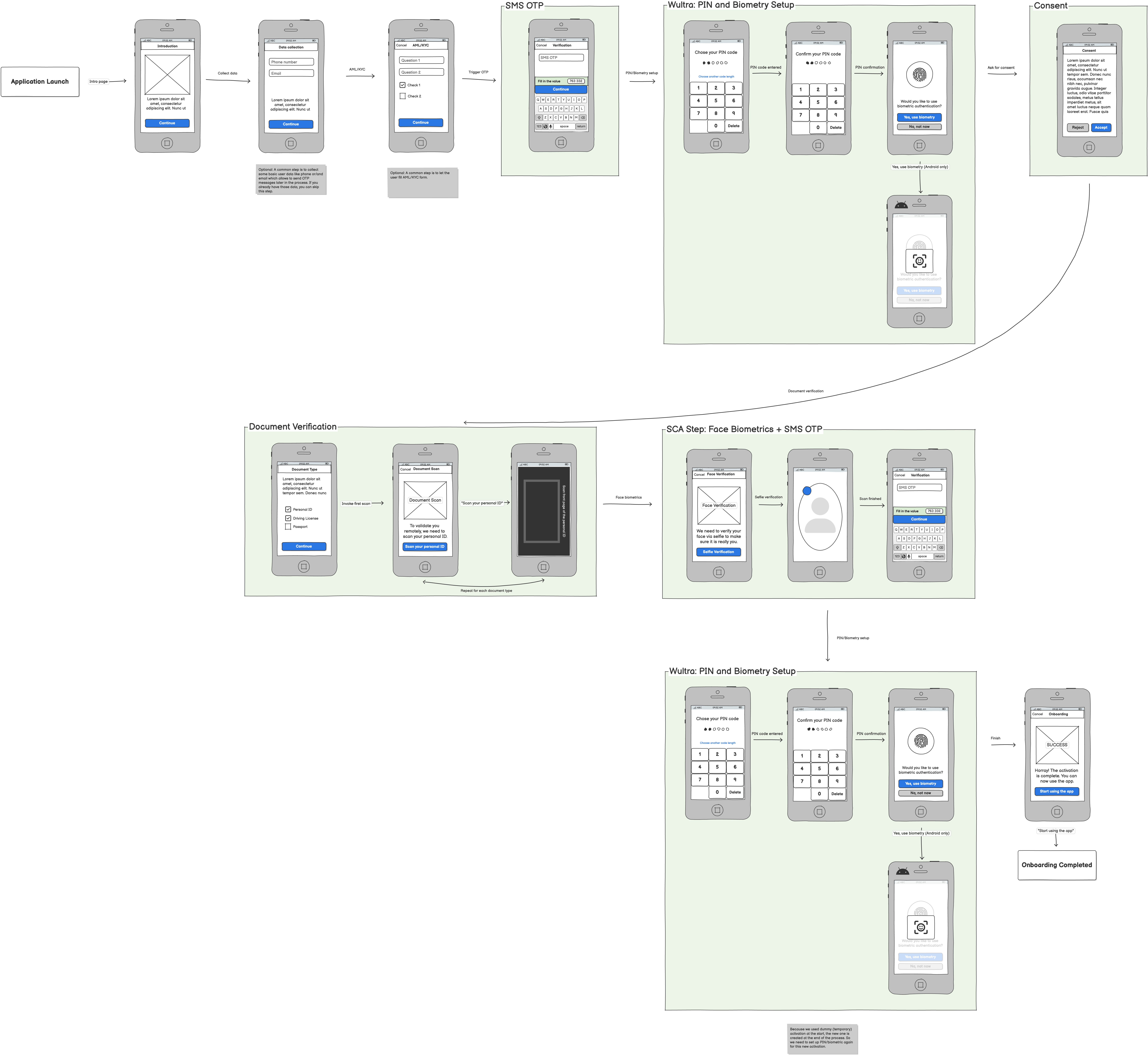
- SMS and email verification: This leads to the creation of a “soft verified identity.” This is a natural first step for the customer that makes it possible to complete the process later in case of interruption. This step also allows the sales team to help the customer finish the process.
- Personal data gathering: Even though this may be supported by optical character recognition (OCR), the user is often intentionally required to enter data to be compared with their ID document to ensure compliance and deflect fraud. Additional data not presented in documents can also be collected. The address is validated, and the information is checked by external registries.
- Risk scoring: Specific data required for scoring is requested from the client and sent to internal bank systems. After this step, there is a high probability that the customer will not be rejected by the bank and is ready to close the contract. Now is the right moment ask customers to prove their identity.
- KYC Process: The process is started internally to correlate all activities related to the Digital Onboarding.
- ID scanning and verification: The customer is prompted to select the type of document they can present. The application then does the following:
- Automatically identifies the identity document type (passport, ID card, driving license, foreign permanent residence cards), edition, and issuing country
- Photo Capture Method: It is essential that during the onboarding process, the user is not allowed to upload a photo of himself/herself. Being able to upload a photo of a document allows the user to make manipulations that cannot be detected.
- Document Data Cross-check: Some identity documents contain Machine-Readable Zones (MRZ). This provides additional levels of document authenticity detection, as tampering with the MRZ field requires more advanced knowledge.Visual Detection of Attacks: The solution can detect some methods of document forging, including black and white photocopies or detection photos of documents taken from a monitor or laptop screen.
- Extracts all required fields of the document and parses them into text.
- Supports Latin, Cyrillic, Arabic, Greek, Thai, traditional Chinese, and Bengali scripts.
- Extracts the portrait image of the document holder for biometric verification.
- KYC Process Orchestration: The result of the document verification is populated to the process instance. This enables the execution of configured workflow for the onboarding based on the process variant, document verification result, or extracted data. User actions like manual approval or system tasks like document verification in the government registry can be configured. The registry of the available system task will be developed based on the bank’s requirements and the countries’ compliance requirements.
- Face Auto Capture: The customer is asked to present themselves to the camera. The image is captured automatically when all requirements have been satisfied. The system checks and verifies the following:
- Face Matching: a match with the ID photos (or photos in either the customer’s or external databases): The person is the same individual presented in the picture provided in the previous step
- Liveness Detection: Liveness detection ensures that the selfie photo is genuine and detects potential presentation attacks (faces displayed on electronic screen, printed faces, 2D masks, 3D masks).
Types of liveness detection:
- Express Liveness Detection: Individuals take a near-instant face capture. Multi-frame liveness detection analyzes the imagery for spoofs presented to the camera, such as 2D and 3D masks, photos, and presented videos, and the device for spoofs injected into the system, like emulators, virtual cameras, and man-in-the-middle attacks.
- Dynamic Liveness Detection: For the highest identity assurance, patented Flashmark technology sends a unique color code to the device. The reflection of light confirms the individual is authenticating in real time, delivering advanced protection against AI-generated attacks, like deepfakes.
- Orchestrate KYC: After the face verification, the rest of the configured flow is executed. Additional user tasks for approval or system tasks, like propagating the user identity to the bank systems, are also executed.
After the onboarding process is complete, the customer’s identity is fully confirmed. Customers can then close the contract and sign it. We expect the product presentation and selection to be part of the digital product catalog and order flow, not delivered by Wultra.
If necessary, Wultra can proceed with these steps by working with “default” product versions (i.e., a current account) to simplify the onboarding of a new client. The generated contract can be signed using a newly activated mobile token and additional SMS OTP.
Client Recovery
This is a scenario for a known user with a lost or new device.
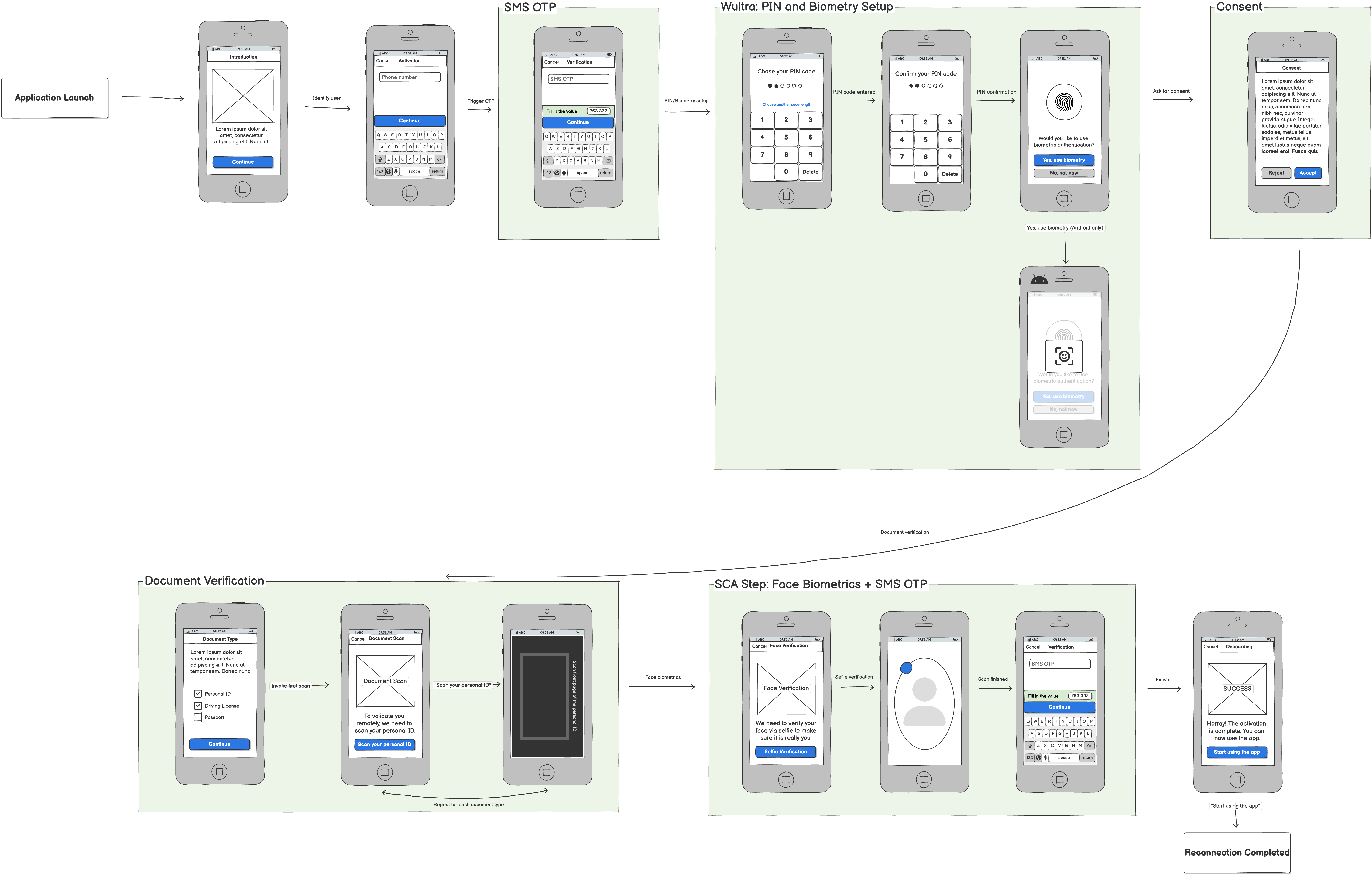
Activating a new mobile application (e.g., an existing customer with a new phone) uses the same core components of ID scanning and verification and liveness detection. In this scenario, the components are combined to check an existent identity and are typically combined with SMS OTP.
It’s important to note that Digital Onboarding boosts security by:
- Adding a step that cannot be phished out easily - while the user can pass it easily, there’s no information the user gives away to the attacker.
- Capturing the photo of a person using the device on which the registration takes place (which is, on its own, a protective measure).
Re-KYC
This is a scenario for an onboarded user with expired or new documents.
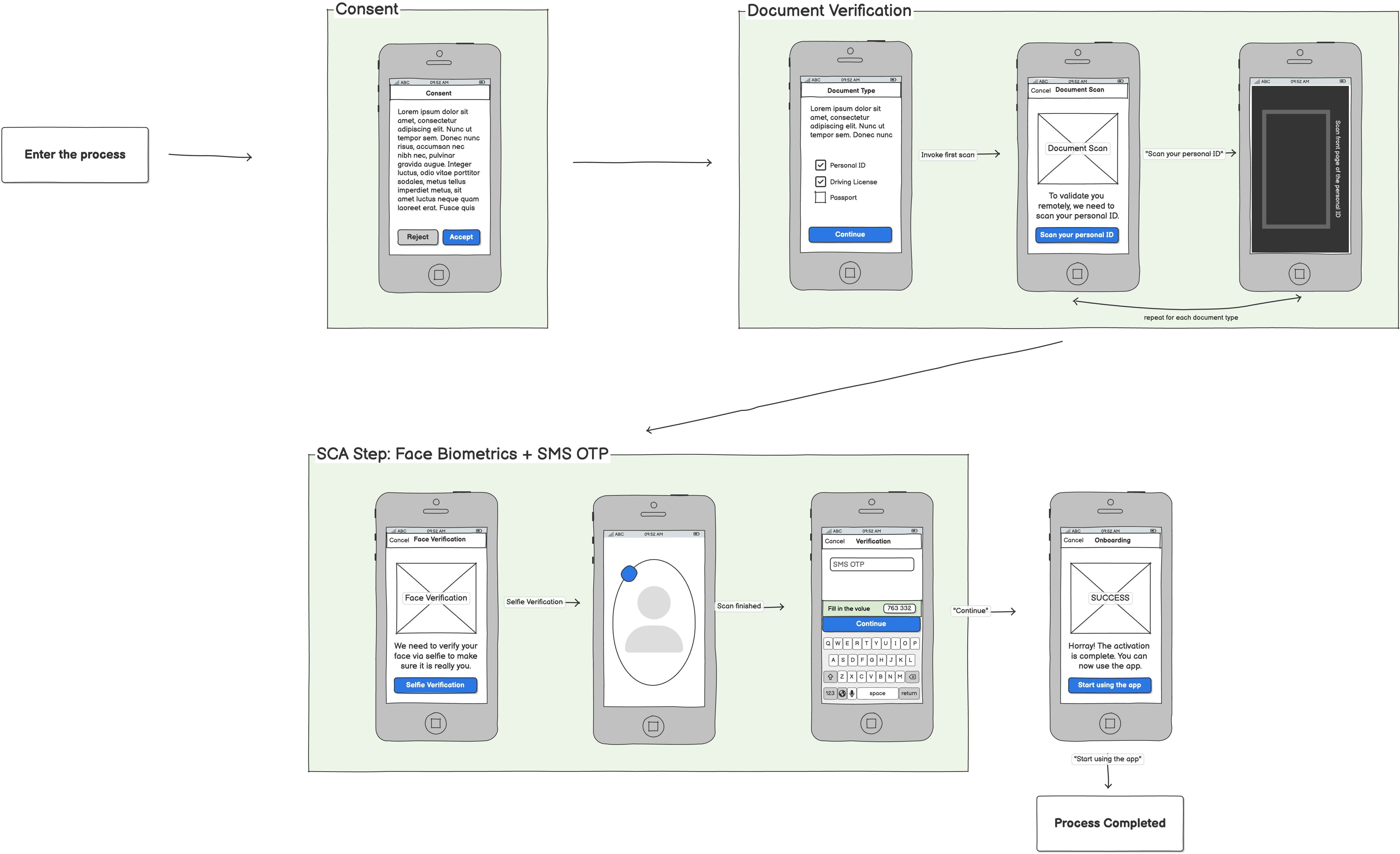
Re-KYC for existing customers follows a streamlined journey that re-uses the same trusted components of consent collection, document verification, and strong customer authentication. In this process, users reconfirm their identity by scanning an approved document and completing biometric face verification, supported by an SMS OTP step to ensure possession of the registered device.
It’s important to note that Re-KYC enhances security by:
- Revalidating identity with a combination of document authenticity checks and live face capture — making impersonation significantly harder.
- Ensuring the person completing the process is both the legitimate user and physically in possession of the enrolled mobile number.
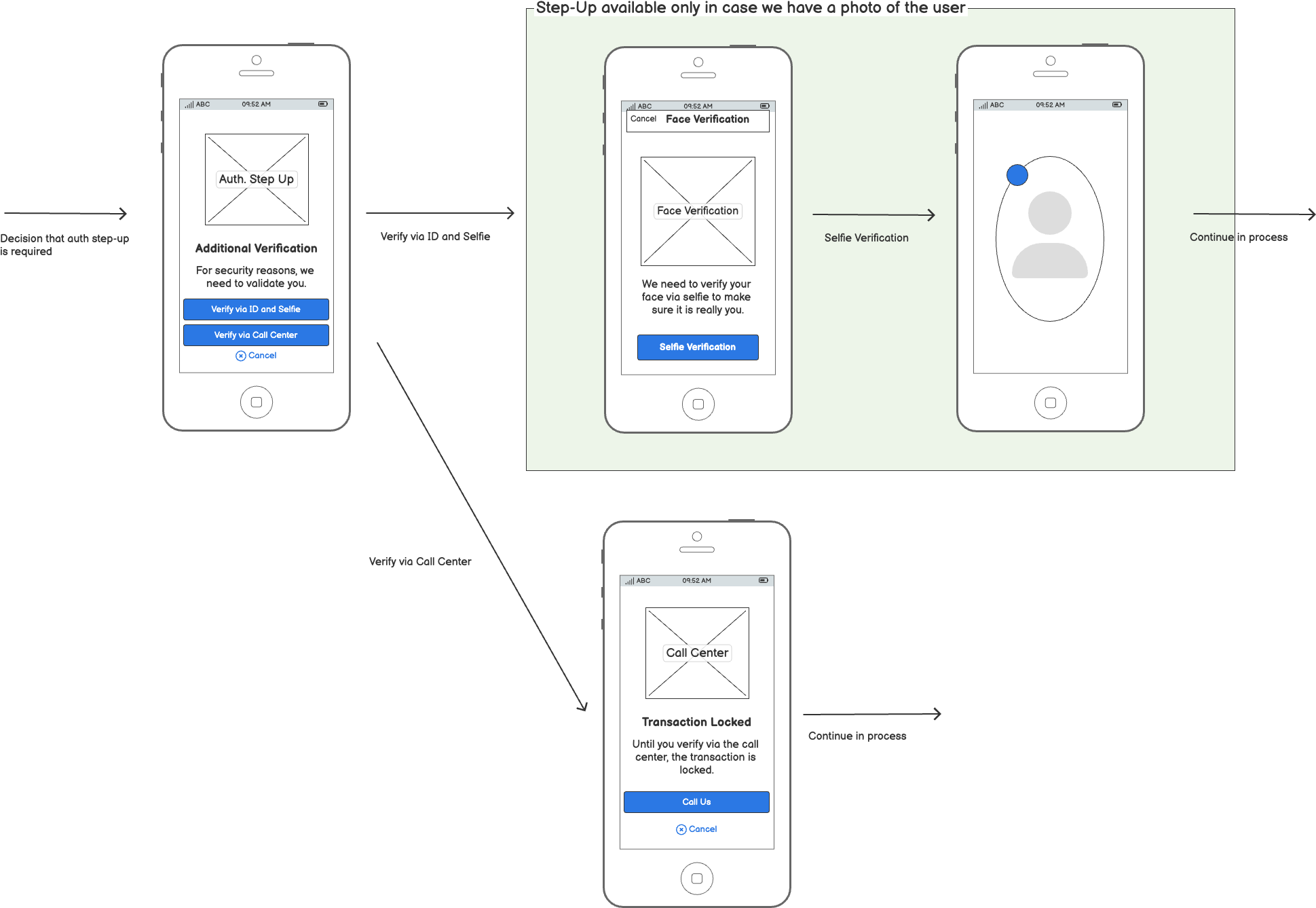
Authentication Step-Up
This is a scenario for adding a liveness check before a any high-value/high-risk or sensitive operation.