
PowerAuth Integration
This page explains how the keystore authorizes a wallet request with the user’s PowerAuth activation, and why it relies on device signatures rather than PowerAuth codes. The PowerAuth activation id is also the keystore’s unitId.
Request Checks
Before any HSM operation on a user request, the keystore runs these checks in order:
- Envelope decryption. The keystore asks PowerAuth Server for the decryption key of the temporary key named in the request, and decrypts the body. This proves that the request was encrypted for this activation and keeps it confidential. It does not prove who the user is.
- Unit check. The unit must exist (
400 unit_not_found) and must not be revoked (409 unit_revoked). - Signed-request validation. The keystore verifies the signed request inside the envelope: every device signature against the device public keys stored for the unit, then
aud,sub, theiatwindow and the single-usejti. This is the user’s authorization. - Activation status. PowerAuth Server confirms that the activation is
ACTIVE, and the request matches stored device public key(s). - HSM operation. Only then does the keystore call the HSM through PKCS#11. To create a key, the HSM generates a key pair, wraps the private key under the wrap key of its domain and seals the result under the bind key. To sign, the HSM opens the seal, unwraps the key, signs and destroys the key. The HSM keeps no per-user keys. See HSM Setup.
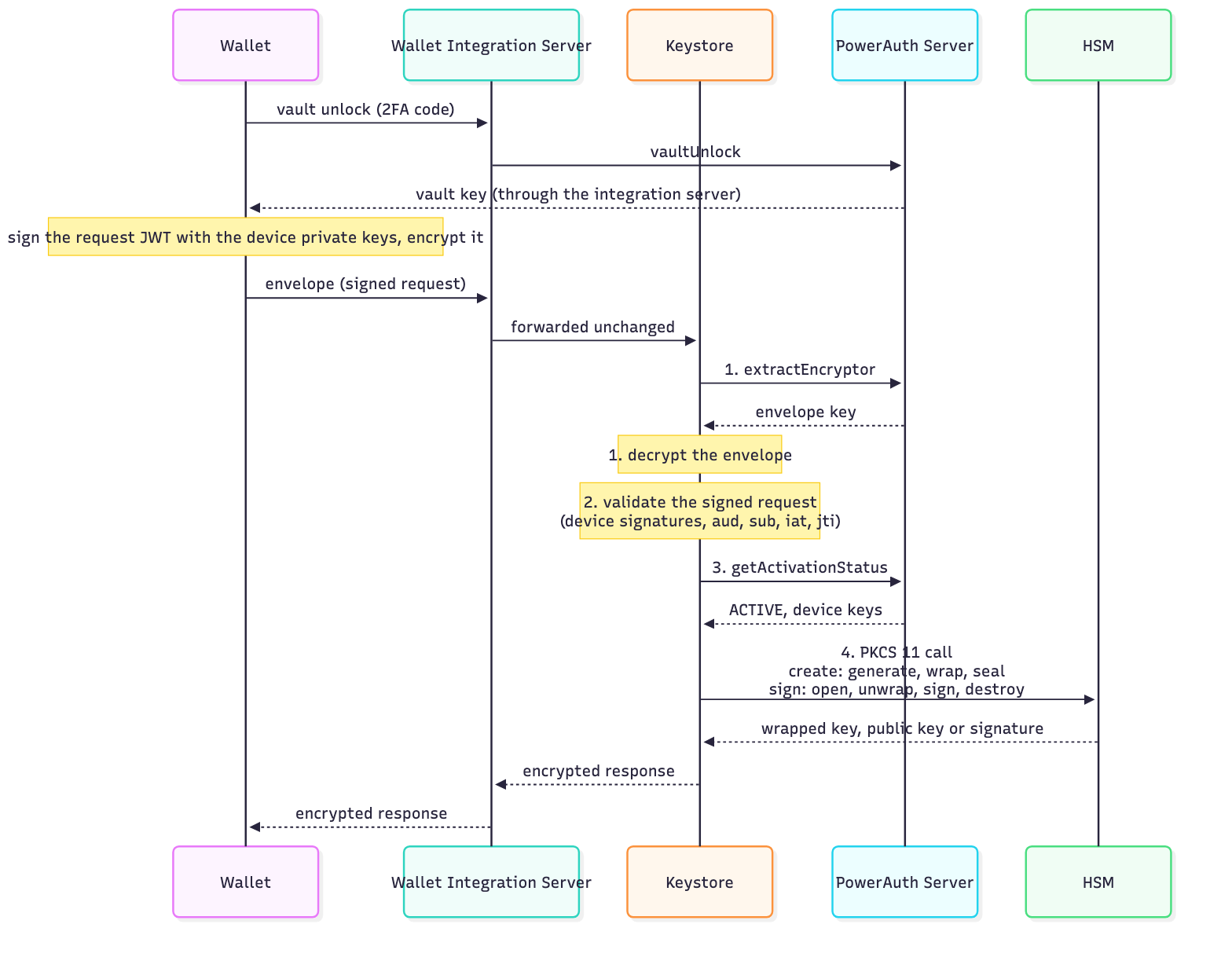
The diagram shows the target design of the user endpoints. Implemented so far: the software wrapped-key format and the SoftHSM2 provisioning scripts. Not yet implemented: the runtime HSM operations (PKCS#11 wrapping, sealing and signing), the REST endpoints and the PowerAuth Server calls.
Role of the Wallet Integration Server
- Registers the activation as a unit during the activation, before the commit (
POST /v1/pa/units), and revokes the unit when the activation is removed. - Serves the PowerAuth vault unlock.
- Forwards every user request of the wallet unchanged. It cannot read the encrypted bodies and cannot sign with a user’s keys, because the keystore itself verifies the device signatures.
REST API Overview
| Action | Endpoint (POST /v1/…) |
Caller authentication | Encrypted | Key purpose |
|---|---|---|---|---|
| Register a unit and create its user-signing keys | pa/units |
Backend token | no | USER_SIGNING |
| Revoke a unit | pa/units/{unitId}/revocation |
Backend token | no | – |
| Sign with the user-signing keys | pa/units/{unitId}/signatures |
Device signature | yes | USER_SIGNING |
| Create the WIA key | eudi/units/{unitId}/wallet-instance-keys |
Device signature | yes | WALLET_INSTANCE |
| Issue a WIA and sign proof-of-possession (PoP) JWTs | eudi/units/{unitId}/wallet-instance-attestations |
Device signature | yes | WALLET_INSTANCE |
| Create credential keys with a key attestation (KA) and an optional proof JWT | eudi/units/{unitId}/credential-keys |
Device signature | yes | CREDENTIAL |
| Sign key-binding JWTs (KB-JWT) | eudi/units/{unitId}/key-binding-signatures |
Device signature | yes | CREDENTIAL |
- Device signature: the user unlocks the PowerAuth vault with PIN or biometry, and PowerAuth Server verifies it. The vault then releases the device private keys, which sign the request (both keys for a hybrid activation). The keystore verifies these signatures. No PowerAuth code reaches the keystore.
- Backend token: a call of the Wallet Integration Server authenticated as a backend caller: a bearer token now, mutual TLS later.
- Encrypted: the request and response bodies are encrypted end to end between the wallet and the keystore. Every call from the wallet is encrypted; backend calls are not.
Why Device Signatures Rather Than PowerAuth Codes
PowerAuth codes are symmetric: PowerAuth Server knows the same secrets and could compute a valid code itself. Certifying that the user has sole control of the keys, as required for a WSCA/WSCD or for eIDAS level of assurance high, needs evidence that only the user’s device can produce. The PowerAuth code therefore only unlocks the vault, and the keystore accepts only signatures made with the device private keys.
Related Documentation
- API General Principles
- EUDI Wallet Flows
- Comparison with the German Model
- Glossary
- PowerAuth Server
- PowerAuth Mobile SDK