
Attestation Issuance
DIW Gateway enables organizations acting as Attestation Providers to issue attestations to EUDI Wallets.
The issuance process is handled by DIW Issuer together with DIW Connector. DIW Connector provides the OpenID4VCI protocol communication and authorization flow with the Wallet Unit, while DIW Issuer creates and cryptographically signs the attestation.
The integrating organization determines whether an attestation may be issued and provides the data to be included in it. DIW Gateway performs the technical issuance process based on this input.
Use Cases
- Issuing SUA Attestation for Strong Customer Authentication use cases - SUA attestations can be used in authentication and authorization scenarios where the Wallet Unit is used as part of a banking authentication or transaction authorization process.
- Issuing attested data for a partner or sister organization.
- Issuing confirmations of bank statements.
- Issuing confirmations of used services for loyalty schemes.
Attestation Provider Registration
Before attestations can be issued, the Attestation Provider must be registered for participation in the EUDIW ecosystem.
For details about Attestation Provider registration and management, see Registered Entity Management.
Credential Configuration
Credential configurations define the attestations that can be issued by DIW Gateway.
A credential configuration defines the credential type, its data structure, attributes, and metadata. The configuration is associated with the corresponding Attestation Provider, and DIW Gateway verifies that the selected provider is permitted to issue the configured credential type.
The integrating organization determines which attributes are issued, their validity, and the applicable disclosure policy. Selective disclosure is supported according to the credential format used.
Credential types, data structures, attributes, mappings to the organization’s data sources, and issuance rules can be configured according to the corresponding use case.
Attestation Data Mapping
The integrating system provides the data required for issuing the attestation.
DIW Gateway supports configuration of credential data structures, attributes, and mappings to the organization’s data sources according to the corresponding issuance use case.
Issuing Attestation to Wallet Unit
The issuance process starts when the integrating system determines that an attestation may be issued, prepares the data to be included in it, and initiates an issuance transaction in DIW Gateway.
DIW Gateway supports both OpenID4VCI authorization models:
- Pre-Authorized Flow — used when authorization has already been performed before the Wallet Unit starts the credential issuance flow.
- Authorization Code Flow — used when authorization is performed as part of the issuance flow.
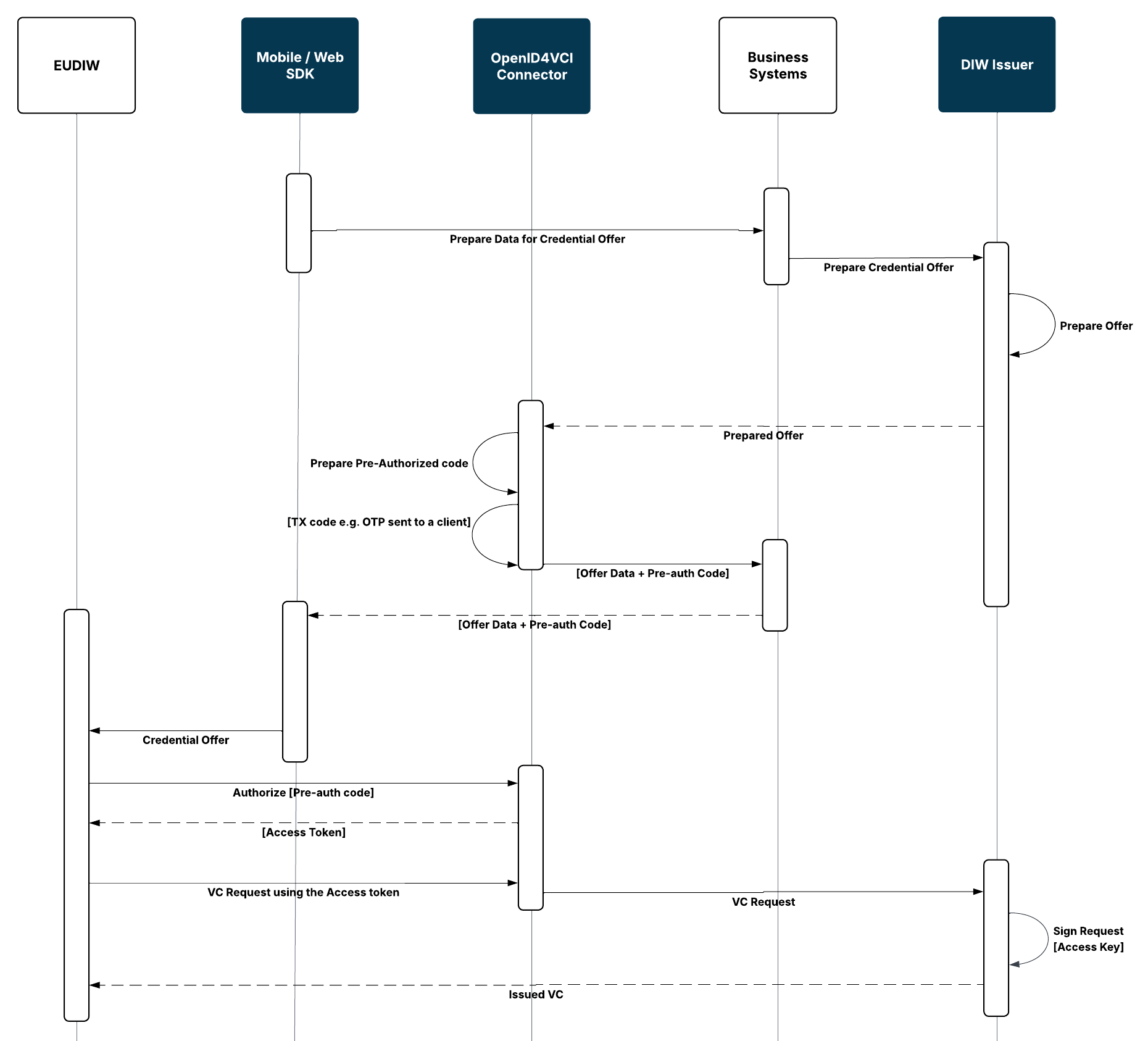
Pre-Authorized Flow Steps
The Pre-Authorized Flow can be used when the issuance process is initiated for a user who has already been authorized by the integrating organization:
- The integrating system prepares the data required for issuing the attestation.
- The integrating system initiates an issuance transaction in DIW Gateway.
- DIW Issuer prepares Credential Offer.
- DIW Connector prepares a pre-authorized code.
- The Credential Offer is provided to the Wallet Unit.
- The Wallet Unit authorizes against DIW Connector and obtains an access token.
- The Wallet Unit requests the attestation through the OpenID4VCI Credential Endpoint.
- DIW Connector requests the attestation from DIW Issuer.
- DIW Issuer cryptographically signs the attestation.
- The attestation is returned to the Wallet Unit.
Authorization Code Flow Steps
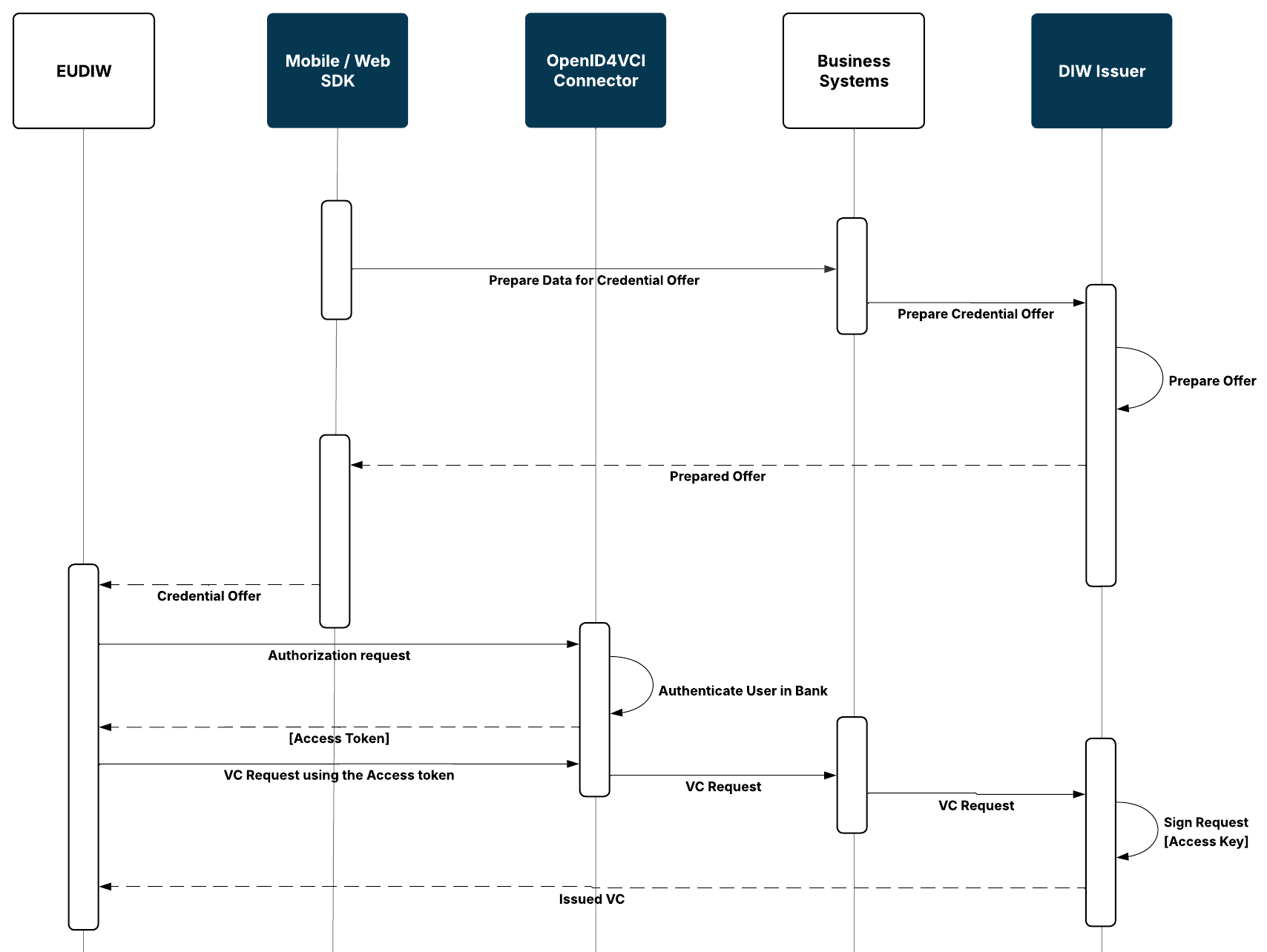
The Authorization Code Flow can be used when the user needs to be authorized as part of the credential issuance process:
- The integrating system prepares the data required for issuing the attestation.
- The integrating system initiates an issuance transaction in DIW Gateway.
- DIW Issuer prepares the Credential Offer.
- The Credential Offer is provided to the Wallet Unit.
- The Wallet Unit starts the OpenID4VCI authorization process through DIW Connector.
- The user is authenticated and authorized using the configured authorization process.
- After successful authorization, the Wallet Unit obtains an access token.
- The Wallet Unit requests the credential through the OpenID4VCI Credential Endpoint using the access token.
- DIW Connector processes the credential request and the corresponding issuance request is provided to DIW Issuer.
- DIW Issuer creates and cryptographically signs the credential.
- The issued credential is returned to the Wallet Unit.
Wallet-Initiated Issuance Integration
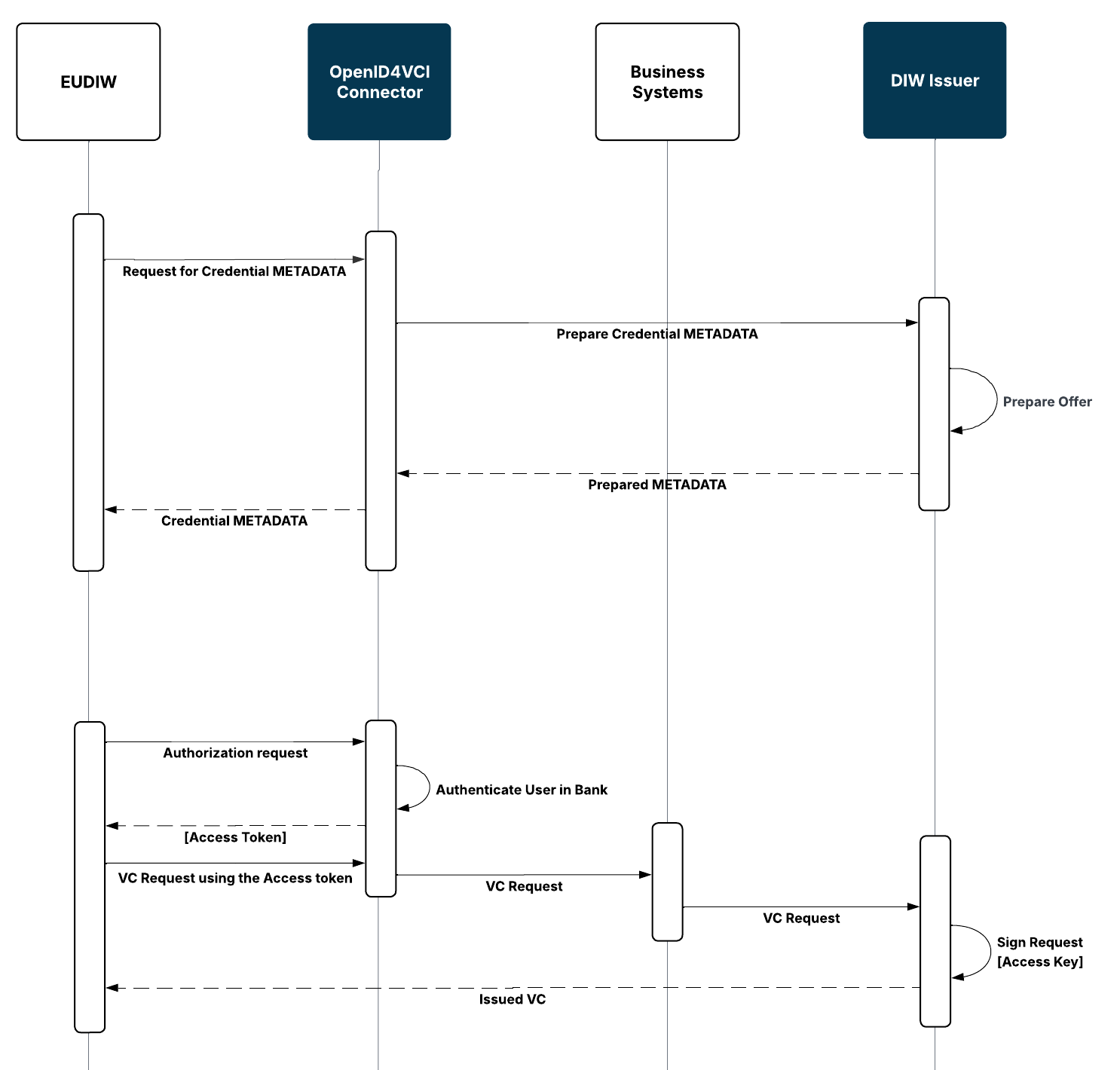
DIW Gateway supports Wallet-initiated OpenID4VCI issuance.
In this scenario, the issuance process is initiated from the Wallet Unit. The issuance continues using the applicable supported OpenID4VCI authorization flow.
A Wallet Unit may expose available Credential Issuers and credentials through its own user interface, for example as a catalogue. The specific discovery and presentation of available providers is handled by the Wallet Unit.
DIW Connector handles the authorization part of the OpenID4VCI issuance flow and the protocol communication with the Wallet Unit, while DIW Issuer creates and cryptographically signs the issued credential.
Attestation Signing
DIW Issuer cryptographically signs issued attestations using the signing key of the corresponding Attestation Provider.
The private signing key can be managed in an HSM. DIW Gateway supports integration with HSMs through the PKCS#11 interface.
In a bank-hosted deployment, production signing keys can remain under the control of the integrating organization in its HSM.
For details about keys, certificates, and HSM integration, see Cryptography, Keys & Certificates.
Credential lifecycle
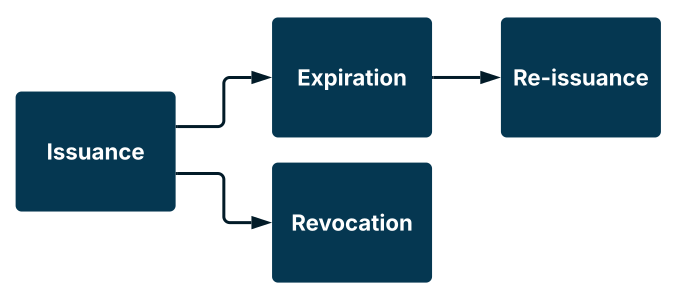
DIW Issuer supports the lifecycle management of issued attestations, including their validity and expiration, status and revocation, and re-issuance.
The integrating organization defines the business rules applicable to the credential lifecycle according to the credential type, use case, and applicable rulebook. DIW Gateway provides the technical mechanisms for managing the lifecycle state of issued credentials and publishing status information where applicable.
Credential type, content, validity period, and the applicable status or revocation mechanism are configurable. The use of a status or revocation mechanism depends on the type of attestation and the applicable rulebook.
- For non-qualified attestations, maintaining a Status List is optional unless required by the applicable rules.
- For qualified attestations, or other attestation types requiring status information, the corresponding status mechanism must be provided.
The cryptographic validity of a credential does not necessarily mean that the underlying business information is still current.
The integrating organization is responsible for determining when changes in the underlying business data require a lifecycle action. DIW Gateway provides the technical mechanisms for performing the corresponding status change or revocation.
Issued Attestation Records
DIW Gateway maintains records of issued attestations.
DIW Gateway provides an attestation Subject ID that can support identification of the corresponding attestation, for example when an attestation needs to be located for revocation.
The content of an issued attestation is stored separately from its metadata and associated cryptographic material. Data retention is configurable. Attestation content can be removed after the issuance transaction or retained for record-keeping according to the configured retention policy.
Lifecycle changes are recorded in the attestation records, while the operations resulting in lifecycle changes are recorded in the audit trail.
For details about audit records, see Auditing & Logging.
Credential Validity and Expiration
The validity period of an issued credential is configurable.
The integrating organization determines the required validity according to the credential type, use case, and applicable rulebook. The validity and status/revocation policy can therefore reflect the characteristics and risk profile of the particular credential.
A credential may cease to be valid when its configured validity period expires or when it is revoked before expiration.
A credential can cease to be valid in two principal ways:
- Expiration - the configured validity period of the credential ends.
- Revocation - the credential is explicitly invalidated before its expiration, for example as a result of a change in the underlying business information.
Expiration is determined by the credential validity period, while revocation is managed through the credential status mechanism. For details, see Credential Status & Revocation.
Credential Status and Revocation
DIW Gateway supports status management and revocation of issued credentials.
Status information is published using the status or revocation mechanism referenced by the credential. The applicable mechanism can be configured according to the credential type and corresponding rulebook.
The use of a Status List is optional for issued attestations unless status information is required by the applicable credential type or rules. Qualified attestations, as well as other attestations requiring status information, require the corresponding status mechanism.
The authority responsible for the credential determines when the credential should be revoked. The integrating organization initiates the status change or revocation through the DIW Gateway API, and DIW Gateway performs the technical change and publishes the updated status information.
Re-Issuance of Credential
DIW Gateway supports the re-issuance of previously issued credentials, allowing a Wallet Unit to obtain a newly issued credential through the existing credential lifecycle.
The Wallet Unit typically initiates re-issuance using a refresh token provided during the initial credential issuance.
DIW Gateway supports re-issuance of the credential and can update its signature while keeping the underlying credential data unchanged.
Handling Credential Data Changes
The validity of an issued credential does not necessarily mean that the underlying business information remains current throughout the entire credential lifecycle. Changes to the source data may therefore require a revocation even if the credential itself is still cryptographically valid.
The organization acting as the credential Issuer is responsible for determining whether a change in the underlying business data requires the existing credential to be revoked.
DIW Gateway provides the technical mechanisms for revoking the credential based on the Issuer’s decision.