
User Identification and Authentication
DIW Gateway enables secure user identification and authentication through the EUDI Wallet ecosystem. It ensures the secure retrieval, validation, and transmission of Personal Identification Data (PID) between EUDI Wallets and client systems while maintaining compliance with digital identity standards.
The solution supports multiple authentication methods, including QR code scanning, NFC-based verification, and direct application handshakes. In addition, it allows users to authorize sensitive operations using their EUDI Wallet, providing an additional layer of security and trust.
Registering Verifier
The client must register with the member state registrar to request a Verifiable Presentation from a Wallet Unit. This is a mandatory scenario. The exact process can differ for different Registrar products. DIW Gateway provides a complete set of management APIs to create a registrar request and upload the obtained Access and Registration certificates for the requesting VP. The product offers a multi-tenant solution for registering multiple Relaying Party Instances for a single Relaying Party.
Core Scenario Steps
- Create a Relaying Party with required metadata.
- Optionally configure Relaying Party Instances.
- Configure the list of required credential types for the Relaying Party (Instance).
- Configure business mapping for credential types and the selected scenario.
- Prepare a request for the Registrar.
- Prepare Certificate Signing Request for Access Certificates and Registration Certificates.
- Upload the obtained issued certificates from Registrar Access CA.
Use Cases
- Initial Relaying Party Creation.
- Renewal certificate requests to the EUDIW ecosystem.
- Change of required data (Verifiable Credential types) from EUDI Wallet.
Identity Verification by PID
The PID verification scenario serves several use cases within the bank and is one of the main capabilities offered by EUDIW. The scenario is, in fact, retrieving a Verifiable Presentation from a Wallet Unit with the special type of Verifiable Credential: Person Identification Data (PID).
Local Integration
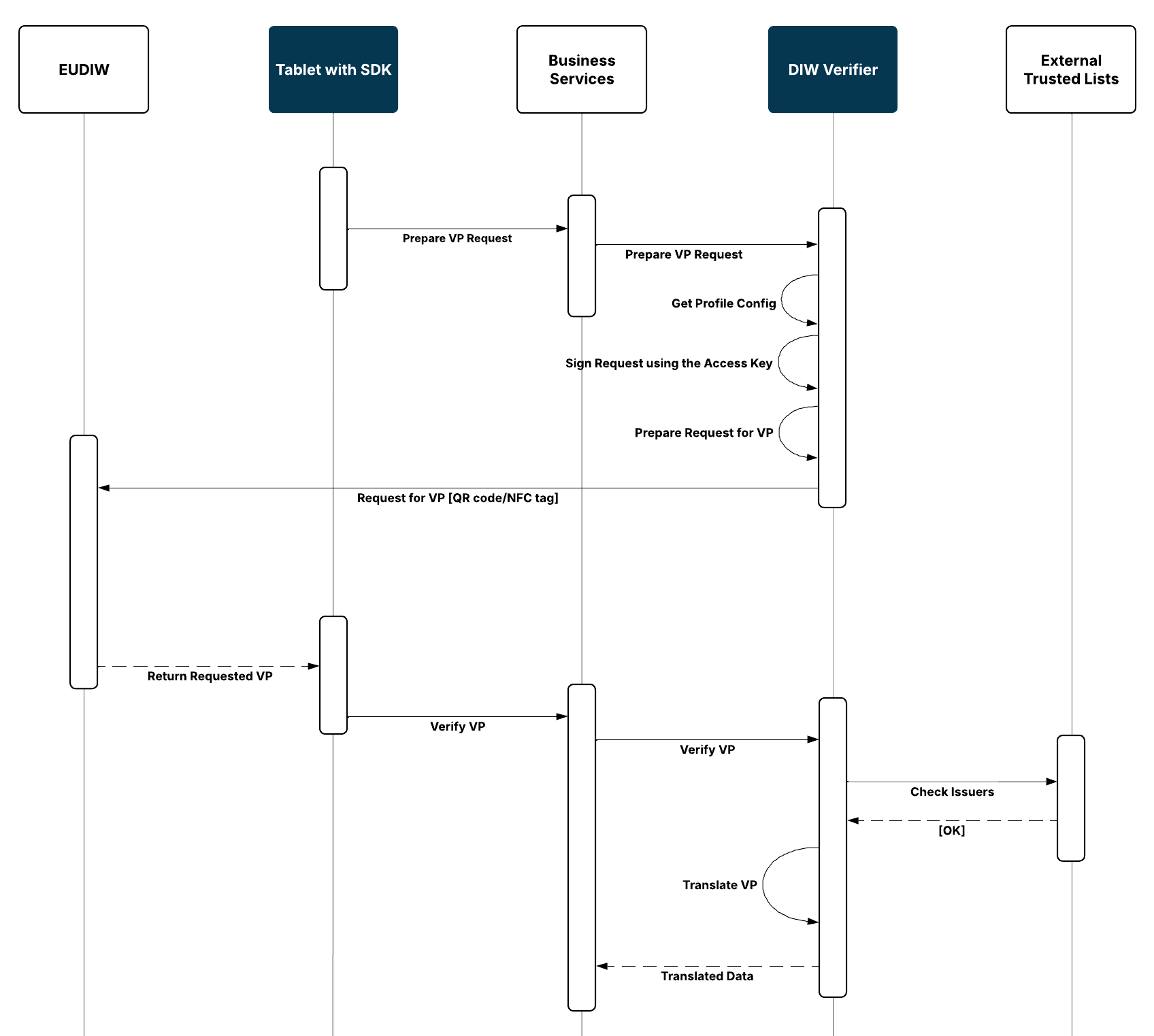
The local scenario is carried out using f.e. a tablet with SDK at the branch.
Remote Integration
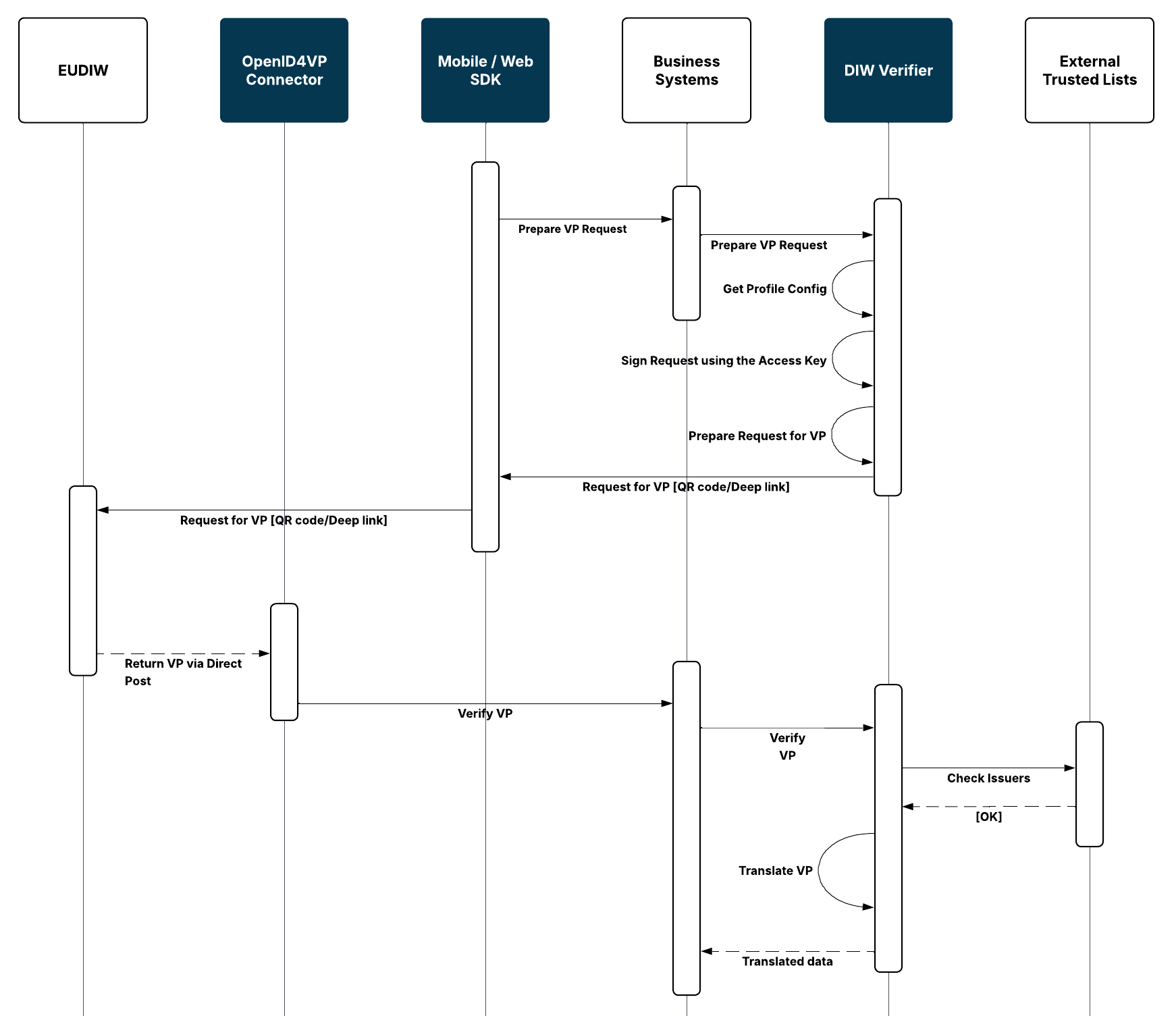
The remote scenario involves using mobile banking or internet banking integrated with SDK.
Core Scenario Steps
- Client system requests data from a Wallet Unit for a specific scenario.
- DIW Verifier prepares an authorization request for the scenario, includes transactional data, and signs the request using the access key.
- The client system uses the Gateway SDK to initiate a Wallet Unit (QR code, deep link, or NFC tag).
- Wallet Unit returns the requested VP to either the bank, the SDK, or the OpenID4VP Connector.
- The VP is verified by DIW Verifier (locally and against Trusted Lists).
- The VP is translated by DIW Verifier into a client-defined structure, with an indication of which data from the selected profiles was not returned.
Use Cases
- New User Onboarding
- The PID is used for identity verification of a natural person during the onboarding process.
- Existing User Access Management
- The PID is used to verify the identity of an existing payment user and associate them with the authentication.
- User Identity Verification
- Identifies user – remotely or in presence – for KYC and AML purposes (e.g., signing contracts, withdrawal or deposit exceeding limit)
Requesting Verifiable Presentation from Wallet Unit
The Wallet Unit can hold multiple types of verified information (attestations) and prepares a Verifiable Presentation containing only the data required for the given purpose, subject to user consent. This mechanism enables the client to reuse the same request-and-present flow across different customer journeys - typically to obtain additional user-approved data for product applications and servicing processes.
The same approach can also be used for data sharing within a banking group or with partners by presenting bank-defined attestations with a tailored claim set.
A key advantage is that the user explicitly sees what data is requested and approves the exchange, which supports GDPR accountability (purpose transparency and demonstrable user approval) when sharing customer data across group entities.
Core scenario steps are the same as for PID attestation - this means the whole process can be reused; only the mapping and data usage would differ.
Use Cases
- Verified data for product application, like verifications of education, employment, and income for a loan application.
- Sharing product details via internal attestations for credit scoring.
- Sharing personal details via internal attestation for cross-selling.
Client Authorization and Authentication
The scenario is the use of two scenarios: Issuing SUA Attestation to Wallet Unit and Requesting Verifiable Presentation from a Wallet Unit.
The SUA Attestation can be issued directly by a client or by a partner organization (and vice versa, the client can issue the SUA Attestation used by partners).
Core scenario steps
- Using the issuing capabilities, the client issues a SUA Attestation. The Attestation contains user identification - known to the client and potentially to partners.
- The client (or partner) creates an Authorization Request. The request contains transactional context - i.e., the information related to the respective transaction or operation.
- Wallet Unit creates a signed Verifiable Presentation including the context.
- The client receives the VP via an outbound channel (e.g., PSD2 Open API) and verifies it using the DIW Verifier.
Use Cases
- SCA for PSD2 Third Parties
- SCA for internal authentication and authorization
- Verification of operations for partners or sister organizations
View Verification History
The solution maintains a complete audit track of activities and the requested Verifiable Presentation. The solution provides, via the API, the whole history of which VPs were requested, the verification results, the expiration times of the VPs, etc. Within the history, cryptographic material intended for subsequent (ex post) proof verification will be retained.