
Electronic Signing
Product Overview
Wultra Signer Cloud is a powerful and secure mobile solution that enables users to sign PDF documents using their mobile phones. The signing process leverages strong customer authentication (SCA) provided by PowerAuth to ensure high security and user identity verification.
Key Features
- Seamless Mobile Signing: Users can digitally sign PDF documents from their mobile devices, ensuring a smooth and efficient experience.
- Strong Customer Authentication (SCA): Signing operations are protected by PowerAuth, ensuring only authenticated users can perform digital signatures.
- Certification Authority Integration: The generated certificate is signed by a Certification Authority (CA) component to guarantee its validity and trustworthiness.
- Flexible Signing Options - External and Cloud: The solution can either provide signatures using the private key stored on a mobile device as part of PowerAuth SDK or provide whole PKI infrastructure on the backend and use the PowerAuth only as a loosely coupled SCA provider.
- End-to-End Security: The process—from user authentication to signature generation—is designed with strong security and integrity in mind. The solution is on the Wultra roadmap to quantum-resistant authentication.
Standards
Solution supports PDF Advanced Electronic Signatures (PAdES) defined by ETSI EN 319 142 standard with PAdES-B-B and PAdES-B-T level.
PAdES is recognized by eIDAS as Advanced Electronic Signature (AdES).
Signer Cloud supports PDF 1.7 documents defined by ISO 32000-1 standard.
High-Level Architecture
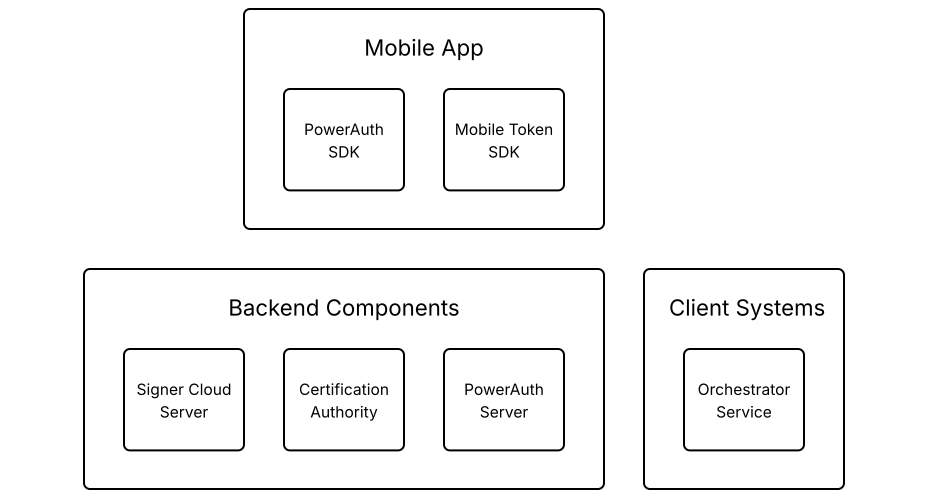
Signer Cloud consists of two main backend components: The Signer Cloud Server and the Certification Authority (CA). The solution relies on PowerAuth.
Integrators must implement both the mobile application and the orchestrator service. Wultra, however, provides software development kits (SDKs) to help with the integration on mobile application.
Mobile Libraries
PowerAuth SDK
The solution requires a device with PowerAuth activation. An activated device can request a certificate and create signatures. Also, it uses this SDK to add an additional layer of protection for data transferred between the mobile application and the backend servers. SDK has a React Native bridge.
Mobile Token SDK
Optional SDK will support operation authorization on the device, depending on the usage mode.
Backend Components
Signer Cloud Server
The component enrolls users and assembles signed PDFs with user certificates. The Signer component works in two basic modes. External Mode utilizes signatures provided by another component (typically PowerAuth). In Cloud Mode, it generates public and private key pairs and creates digital signatures itself.
Certification Authority (CA)
Preconfigured Certification Authority. The authority provides standard certificate enrollment. The authority root certificate can be configured to ensure trust for signed PDFs in the bank (or even by the public). The CA provides REST API for easy integration. Open Source EJBCA is used as a proven and reliable solution.
PowerAuth Server
PowerAuth solution provides backend device management and works as an SCA provider. The PowerAuth provides public and private API. Public API is consumed directly by PowerAuth SDK. Private API is exposed for integration with other backend services.
Client Systems
Orchestrator Service
This is an external service layer that is responsible for coordinating signing operations using the capabilities provided by Wultra components. It also provides user data and serves PDF files for signing.
Business Architecture
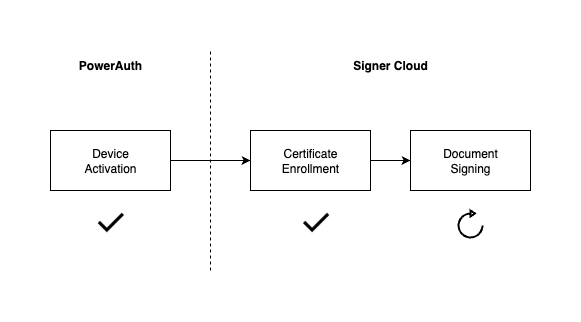
The schema illustrates the process the user must undergo to sign documents.
Device Activation
You can understand this step as prerequisite for using Signer Cloud. During the user onboarding, the mobile device is connected to the user’s identity and security keys are generated. These keys are necessary for next phases.
Certificate Enrollment
To sign a document you need a certificate and enrollment is the process of generating one. Certificate contains information about specific user and cryptographic data from activated device.
Document Signing
The signing process involves adding a digital signature, including a certificate from previous step, to a file. Unlike the previous steps, which are one-time actions, signing may be repeated if you have a valid certificate.
System Architecture
Security
Communication
All communication between components is protected by SSL/TLS.
Cloud Signer Server endpoints are protected by Basic or OAuth2 authorization. Certification Authority endpoints are protected by mTLS user certificate issued by authority itself. The specific setup depends on the specific bank requirements.
Secrets
Sensitive configurations are managed via Docker environment variables, ensuring that secrets are not stored in plain text within the system. This enables credentials management via Kubernetes Secrets and mechanisms like Vault Secret Operator.
Encryption at Rest
All components expect transparent encryption on the database layer. Components like PowerAuthServer enable additional application encryption, i.e., data are encrypted before persistence in the database by a discrete encryption key derived for the record. Signer Cloud Server has the capability to encrypt sensitive data, but this has to be specified during the analytic phase.
Identity Management
All endpoints serving server-to-server communication are protected by Basic authentication or by OAuth Client Credential Flow. Certification authority contains Admin UI with possibility to create users, assign roles, generate access certificates etc.
Availability and Scaling
Any component in the system runs in a high-availability setup with disaster recovery. The application layer—i.e., pods are strictly stateless services, and synchronization, if needed, is done on the database layer. The database layer is expected to run in HA DR in at least an Active-Passive setup, but DB management is considered out of the scope of the response to the RFP.
Integration
The integration of the application components depends on the REST API. No other technology is required.
Auditing and Monitoring
The systems work in standard layers:
- Application Logs
- Application Monitoring and APM
- Audit Logs
Application Logs
All components provide structured logs to the standard output. Configuration can be changed by parameterizing the docker variable, but the recommended approach is sending logs to standard output. By default, the inline format is used, but as the application logging is based on SFL4J and logging is configurable, the format can be changed, for example, by adding a log stash encoder. All application logs contain standard tracing headers and can consume tracing headers on output and emit the tracing header when calling other systems to enable distributed log tracing.
Application monitoring and APM
The components provide a standard Spring actuator endpoint. This enables the standard connection of K8 health and readiness probes and integration with Prometheus. The component also has configurable micrometer tracing (by default, used for generating tracing headers) for tracers OpenTelemetry or Zipkin.
Audit Logs
The system keeps a full audit log of activities via the Wultra auditing library. The audit log is available in the database on a user basis via API.
Data Residency and Data Retention
Components deployed on the bank are fully under the bank’s control, with all data and communication. The components either do not store data permanently or have data purging capabilities.
Performance Requirements
Based on the use-case, we expect a low number of requests per minute. The Signer Cloud Server and Certification authority can be deployed with sizing 2 vCPU and 4 GB RAM. No external volumes are required to run the docker image.
All components should be run in 2-3 instances to ensure high availability and disaster recovery capabilities.
Backup and Restore
The application layer is strictly stateless, and only the deployment pipeline should be backed up to enable new deployment to a new location in a disaster recovery scenario.
The underlying database should be backed up; the recommended approach is to complete a full backup regularly and, in parallel, forward the write-ahead logs (WAL) to different DR regions. In this case, RPO 0 can be reached. The exact DB strategy is in the bank’s governance based on the bank’s IT risk assessment of the KYC service.
System Parametrization and Configuration
The system is configured on a technical level by Docker environment settings to ensure compatibility with any deployment type. Possible parameters are, for example, the OIDC server address, Certification Authority, database connection URL…
Core Functions
| Core Functions | Description |
|---|---|
| Certificate Enrollment | To sign a document you need a certificate and enrollment is the process of generating one. Certificate contains information about specific user and cryptographic data from activated device. |
| Document Signing | The signing process involves adding a digital signature, including a certificate from previous step, to a file. Unlike the previous steps, which are one-time actions, signing may be repeated if you have a valid certificate. |
Certificate Details
A used certificate can be understood as a combination of a user certificate and a device certificate, but we will refer to it as a device certificate. This is because there can be cases where one user has multiple devices, so it is important that the device is clearly identifiable.
Certificate Signing Request
Certificate is issued by Certification Authority (CA) based on Certificate Signing Request (CSR) which is the file that contains user and cryptography data.
This file must be assembled on the mobile device because the certificate signing request (CSR) must be signed using the private key from the activated device. Although the PowerAuth Mobile SDK provides a method for creating a CSR on a mobile device, the client must provide the user data and ensure that it matches the Certificate Profile configuration.
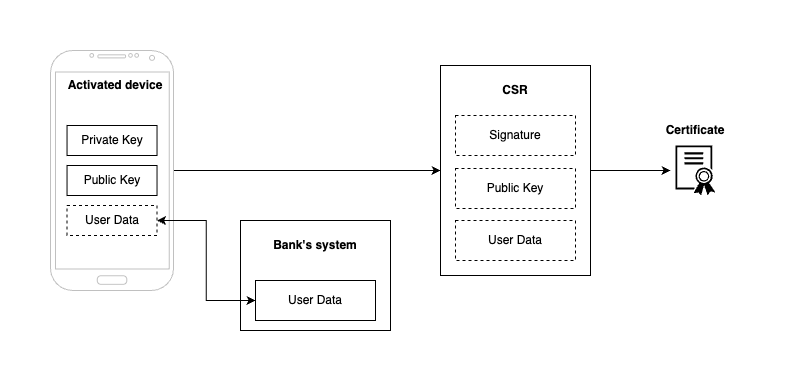
- To assemble CSR we need User Data, Public Key and Signature (made using Private Key). The implementer must provide user data. The public key and signature are covered by the activated device.
- CSR is sent from mobile device to the Signer Cloud Server to generate certificate using Certification Authority.
- Both the CSR and the certificate are stored on the Signer Cloud Server for signing.
Certificate Renewal
Since certificates have an expiration date (e.g., 3 months, 1 year, 10 years, etc.), you need to create a new certificate before it expires.
The solution does it automatically - it’s tracking certificate validity and starts renewal before the certificate expires. For new certificate, you still need a CSR - we use same CSR generated at the start.
It is also possible to start process again manually - it will just create a new CSR and generate new certificate.
Solution Delivery
Artifacts
The solution is delivered as a set of artifacts and documentation. The artifacts correspond with the architectural components. GitHub and Docker Hub are the channels for handing over the open-source components. Wultra Jfrog Artifactory servers are for closed-source delivery.
Documentation is handed over in the Wultra Developer Portal. For each delivery, release notes are attached to document the possible setting of the particular component.
PowerAuth Mobile SDK
- Distribution: npm
- Documentation: Wultra Developer Portal
Signer Cloud Server
- Distribution: GitHub, DockerHub
- Documentation: Wultra Developer Portal
Certification Authority (Keyfactor EJBCA)
- Distribution: GitHub, DockerHub
- Documentation: EJBCA Documentation
PowerAuth Server
- Distribution: GitHub, DockerHub
- Documentation: Wultra Developer Portal
Patch Management and Vulnerability Management
Wultra is an ISO 27001-certified company with a policy for Vulnerability and Patch management. All delivered artifacts undergo regular weekly scanning, which consists of Static Application Security Testing (SAST) and dependency scanning for new findings. The scanning is realized via Snyk, Coverity, and Azure Defender for Cloud. Potential vulnerabilities are evaluated and, according to the rating, fixed.
| Severity | CVSS v3 ranking |
|---|---|
| Medium | 4 - 6.9 |
| High | 7 - 8.9 |
| Critical | 9 - 10 |
Any medium, high, and critical issues will be fixed in the upcoming releases if remediation is known.
Wultra fixes exploitable critical vulnerabilities up to 3 releases retrospectively (the actual release and three previous). The minimal support period is 2 years. The solution must be under a service and support contract.
Wultra fixes exploitable high vulnerabilities up to 1 release retrospectively (the actual release and the previous one). The minimal support period is 1 year; the solution has to be under a service and support contract.
Handover
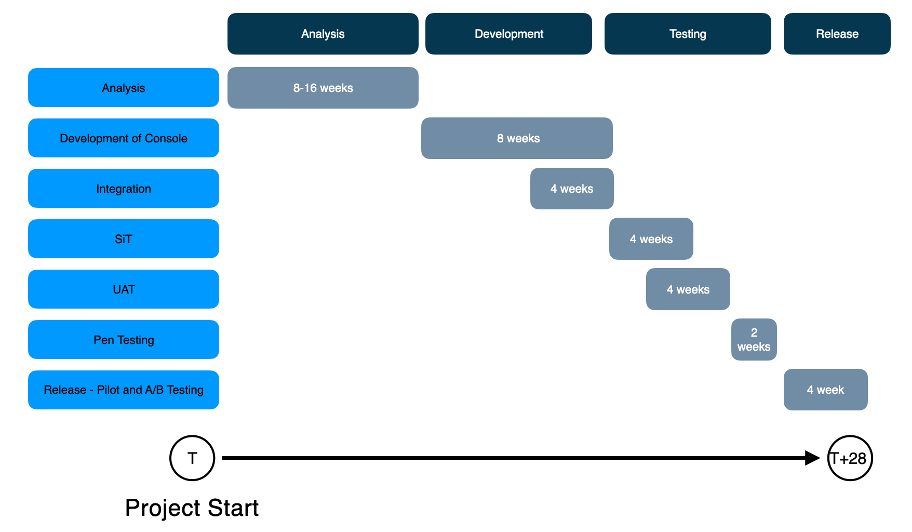
During the project implementation period, we expect several deliveries for development, integration, and testing purposes in the bank. The frequency and volume of software releases will be agreed upon after the analytic phase. The goal is to provide delivery as soon as possible to identify any deficiencies, defects, or misunderstandings. Each release will consist of artifacts and release notes for specific deployment and configuration of the particular component in the bank. After the solution switches to production, the product components will receive regular-year updates of new product features, dependency updates, etc. This is the expected delivery cycle, and a special agreement can be made if necessary.
Support for the connector and process is ongoing, independent of the component’s release cycle, and depends on the future agreement between Wultra and the bank.
Implementation Roadmap
Support
We provide a formal support desk in Jira. The bank can submit a ticket using an account we will establish. Jira measures the SLA fulfillment automatically. For more minor issues or less formal inquiries, we will remain available on Teams / Slack. You can always reach us via email or call. Detailed support terms and conditions are attached to the RFP response.