
In-App Protection Architecture
The In-App Protection solution is composed of a mobile SDK integrated into the protected application and a set of backend components that together provide data collection, event processing, customer integration, console access, and reporting capabilities. The architecture is modular, with individual components fulfilling distinct responsibilities within the overall solution. This separation allows the system to support different integration and operational needs while enabling individual components to be deployed and scaled according to their specific role.
In-App Protection Architecture Diagram
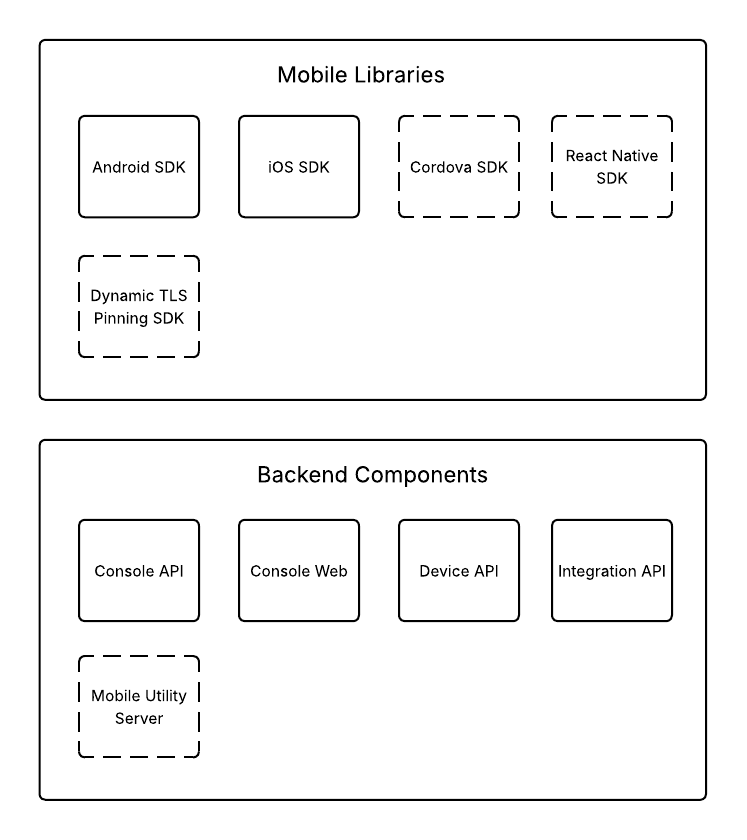
Components of the In-App Protection. The SSL Pinning feature is part of the product, but provided by a different set of components.
Components
The solution is composed of several components, each with a specific responsibility. Since these components process different types of traffic and perform different functions, they can be scaled independently according to the required capacity and performance characteristics.
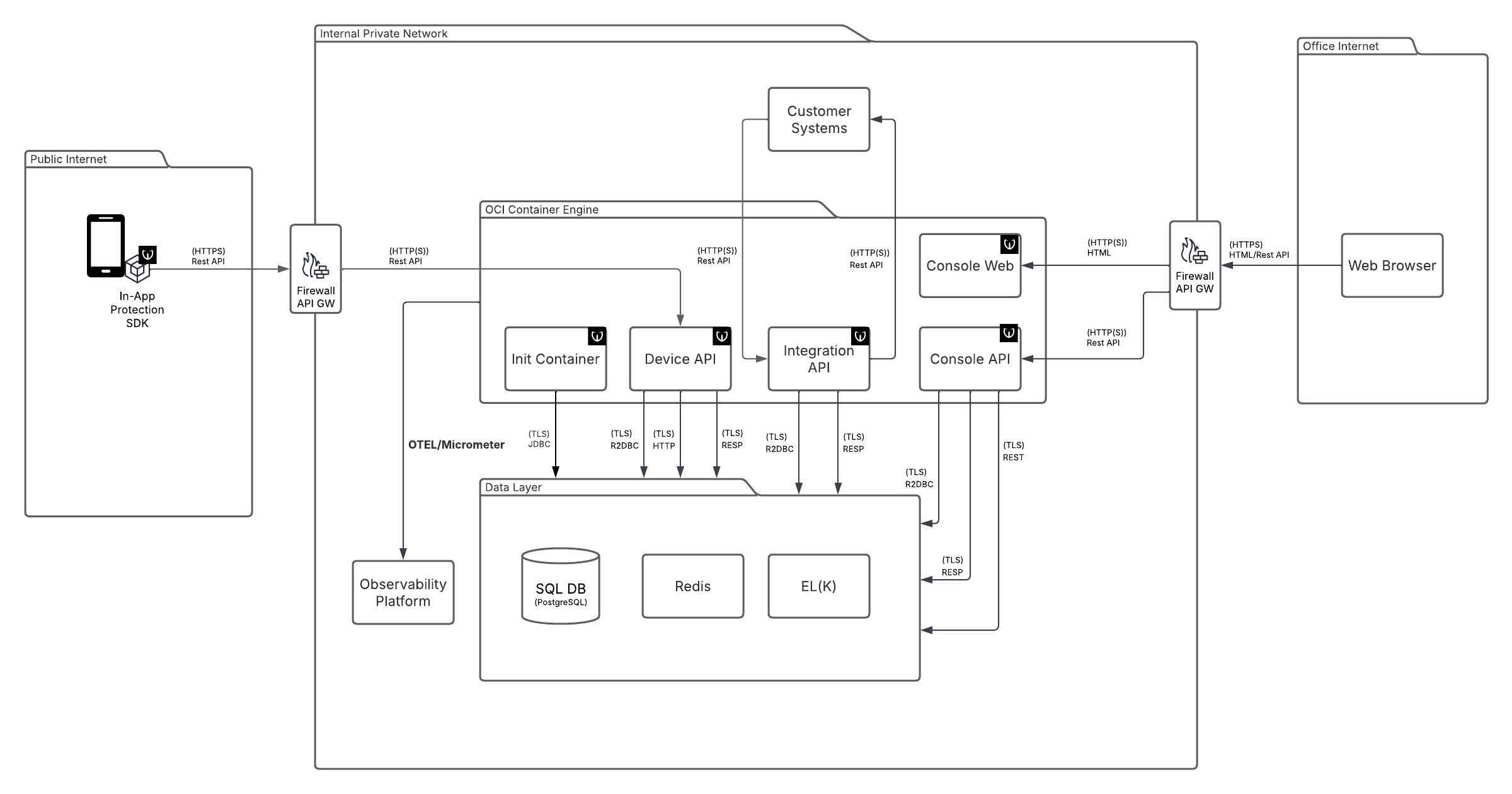
Mobile App with In-App Protection SDK
The mobile application integrates the In-App Protection SDK. The SDK collects device telemetry, detects security-relevant events, and communicates with the backend services. It acts as the runtime component that enables protection features directly in the mobile app.
Init Container
The Init Container is a technical component used to execute database initialization and migration changes as part of the deployment process. It applies the necessary schema updates so that the backend components can start against the correct database structure. Its purpose is to support automated, repeatable, and reliable deployments.
Device API
The Device API is the main backend interface used by the mobile SDK. It receives device data, telemetry, and security events generated by the protected application. It also coordinates the storage and further processing of this data within the backend platform.
Integration API
The Integration API provides the interface to customer systems. It supports push-based integration through callbacks as well as pull-based integration through APIs for reading events. This allows customers to consume platform data in the way that best fits their environment.
Console API
The Console API is the backend interface used by the console application. It provides functions such as authentication, user and access management, and access to the operational data displayed in the console, including system overviews, device details, and investigation-related information. It serves the Console Web frontend and supports secure administration and analysis workflows.
Console Web
The Console Web hosts the static HTML and JavaScript assets of the console application. It provides the customer-facing user interface for browsing system overviews, locating a specific device, and investigating device-related events. It represents the frontend part of the console solution.
SQL DB
The SQL database stores persistent operational data of the platform. This includes device information, recorded events, and other data required for system operation and investigation. It serves as the primary durable data store for the solution.
Redis
Redis Streams are used for asynchronous internal event processing. They allow selected events to be passed between backend components in a decoupled and efficient way. This helps the system handle processing tasks without blocking the main request flow. Redis also serves as a write-through cache for the system.
EL(K)
Logstash is used as the ingestion layer for reporting and analytics data. It receives selected reporting data from the platform and forwards it to the analytics stack. This separates operational processing from reporting-related data flows. Elasticsearch stores and indexes reporting data for search, aggregation, and analysis. It provides the backend data layer for dashboards and analytical views. This enables efficient querying over large volumes of reported data. The presentation of the data is realized via Console Application, but custom Kibana dashboard can be utilized as well.
Customer Systems
Customer Systems represent any external systems that consume data from the Integration API. These may include fraud detection platforms, SIEM solutions, centralized monitoring tools, or other customer-owned systems used for security monitoring and incident handling. They receive platform data either through callbacks or by reading events via the Integration API.
Firewall / API Gateway
The Firewall is an infrastructure component expected to be provided by the customer. It protects the deployment by controlling network communication between external and internal systems and by restricting access only to the required services and ports. It is part of the customer’s infrastructure and is not delivered as part of the Wultra solution.
The API Gateway is an infrastructure component expected to be provided by the customer. It acts as the entry point to the backend APIs and can provide functions such as routing, access control, rate limiting, and SSL/TLS termination. SSL/TLS termination may be performed either on the API Gateway or by a sidecar container, which is not provided as part of the Wultra solution.
The solution provides an API key and API secret for authenticating calls through the API Gateway.
In-App Protection SDKs
The PowerAuth SDK and Mobile Token SDK providing functionalities in the mobile application.