
Activation via Custom Credentials
The most flexible type of activation is “activation via the custom credentials”. In this flow, the credentials are provided as a key-value map. Enrollment Server is responsible for verifying the credentials with an external service that returns a user ID in response.
Example User Flow
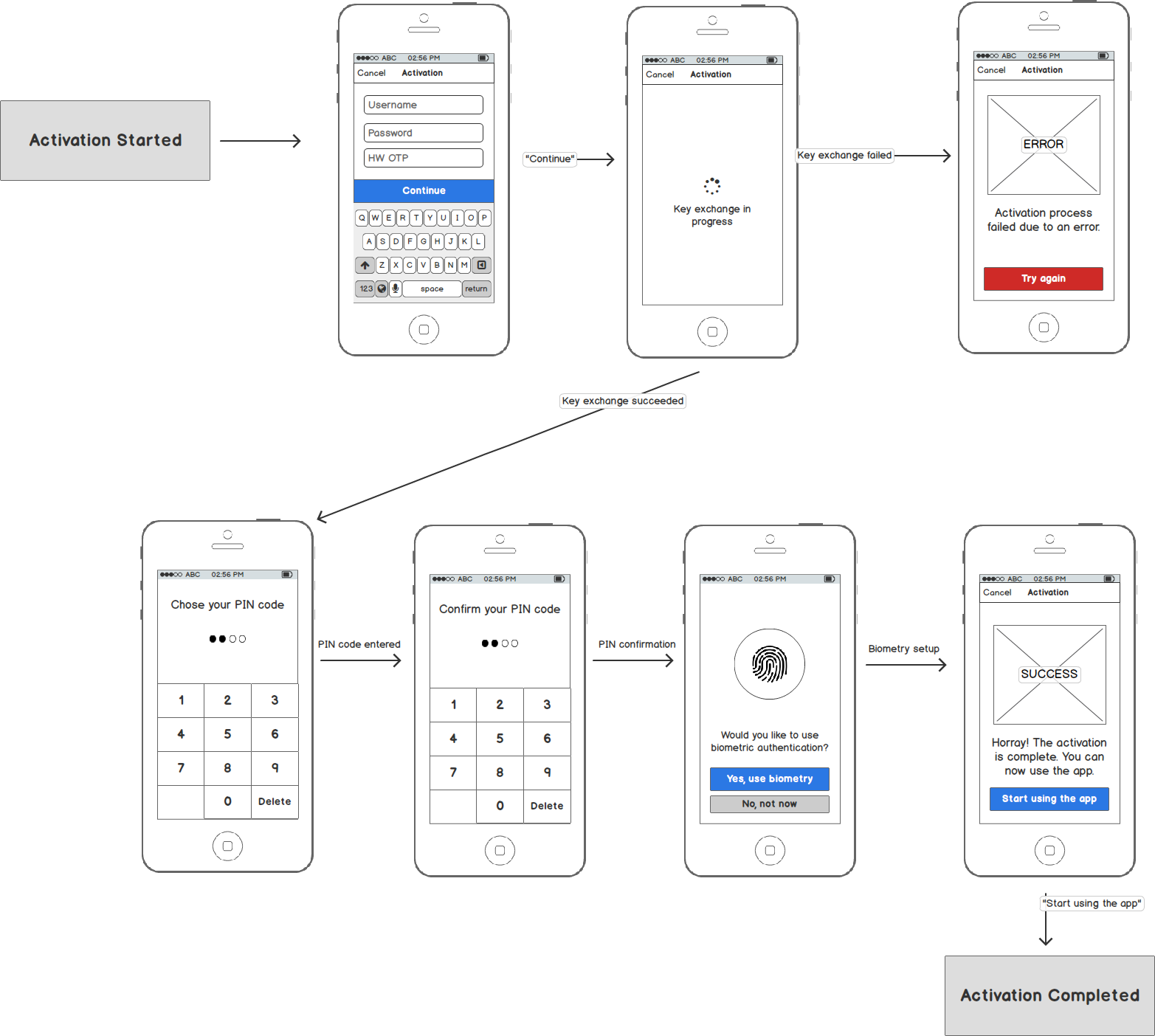
From the user perspective, activation via custom credentials is performed as a sequence of steps in the mobile app. The following diagram shows example steps in the mobile banking app.
Sequence Diagrams
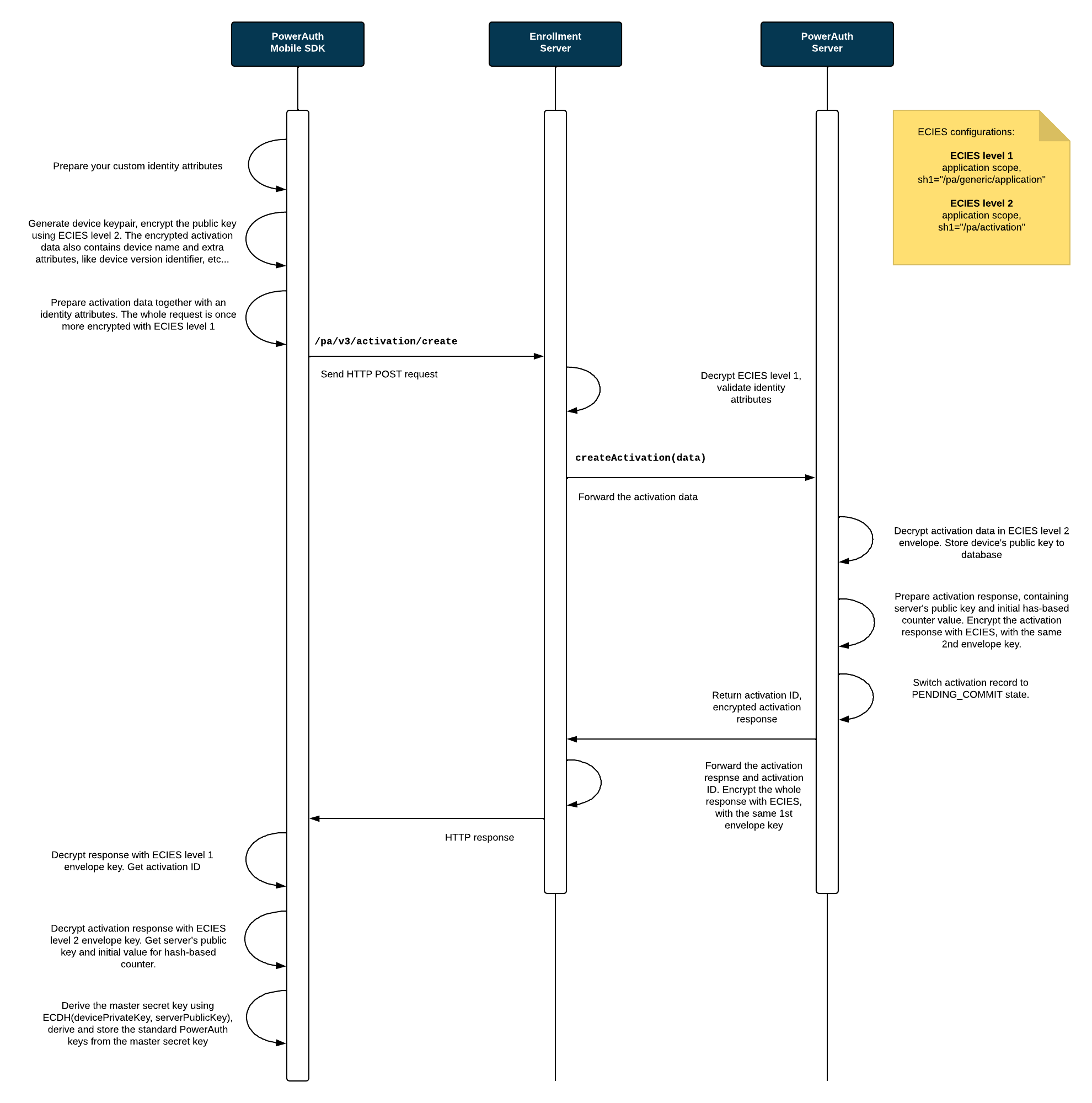
The sequence diagrams below explain the PowerAuth key exchange during activation with custom credentials. It shows how an app with PowerAuth Mobile SDK, Enrollment Server and PowerAuth Server play together in order to establish a shared secret between the client mobile application and the PowerAuth Server.
Process Description
-
User enters the credentials identity attributes
IDENTITY_ATTRIBUTESin the app with PowerAuth Mobile SDK. The entry can be manual or fully/partially handled using other mechanisms, such as deeplink. -
PowerAuth Mobile SDK generates new device signing key pairs (ECDSA and optionally ML-DSA, depending on selected algorithm).
-
PowerAuth Mobile SDK prepares a shared secret request (containing selected
algorithmtogether with ECDHE / ML-KEM contributions) and device public keys, and encrypts the payload using end-to-end encryption (application scope,SHARED_INFO_1 = "/pa/activation"). -
PowerAuth Mobile SDK sends HTTPS request to the
/pa/v4/activation/createendpoint with encrypted payload andIDENTITY_ATTRIBUTES. -
Enrollment Server decrypts the application-scoped end-to-end encryption envelope.
-
Enrollment Server verifies
IDENTITY_ATTRIBUTESusing its custom processing logic. As a result of this processing, Enrollment Server obtains aUSER_IDvalue representing a unique identifier of the user with provided credentials. -
Enrollment Server forwards encrypted activation payload together with
USER_IDto PowerAuth Server. -
PowerAuth Server receives
USER_IDand encrypted activation payload. -
PowerAuth Server decrypts activation payload, stores device public keys, and performs shared secret establishment according to selected algorithm (ECDHE / ML-KEM).
-
PowerAuth Server derives
KEY_ACTIVATION_SECRET, generates its own signing key pairs (ECDSA / ML-DSA), initializes counter data (CTR_DATA), sets activation state toPENDING_COMMIT(activation is now awaiting commit). -
PowerAuth Server prepares encrypted response containing
ACTIVATION_ID,CTR_DATA, shared secret response, and server public keys, and sends it back via Enrollment Server. -
PowerAuth Mobile SDK decrypts the response, derives the same
KEY_ACTIVATION_SECRET, stores server public keys, storesCTR_DATAlocally, and encrypts and stores locally generated private keys using device key encryption key.
Activation Commit
Enrollment Server typically commits activations created via custom credentials automatically. This is the most common and recommended behavior.
-
Enrollment Server commits the activation by calling
/pa/v4/activation/commiton PowerAuth Server. -
PowerAuth Server sets activation to
ACTIVEstate (the activation still requires client confirmation).
If required by a specific use case, Enrollment Server may postpone the commit and keep activation in PENDING_COMMIT until explicitly committed later.
Activation Confirmation
After activation becomes ACTIVE, the mobile application must finalize activation on the client side:
-
PowerAuth Mobile SDK calls
/pa/v4/activation/confirm(authenticated withpossession_knowledgefactors). -
PowerAuth Server clears the
pending_confirmationflag in the database and stores initial factor configuration (optional biometric factor). -
PowerAuth Mobile SDK finalizes local activation state and completes factor setup.