
Authentication and Authorization with SUA
A Strong User Authentication (SUA) attestation can be used with an EUDI Wallet for user authentication and for authorization scenarios, including electronic payment use cases.
The SUA attestation is issued to the Wallet Unit by an organization acting as an Attestation Provider, such as the user’s bank. Once issued, the attestation can later be requested by a Relying Party and presented by the Wallet Unit as part of an authentication or authorization flow.
DIW Gateway supports both parts of this process:
- Issuing the SUA attestation to the Wallet Unit
- Requesting and verifying the SUA attestation
DIW Gateway supports issuing and verifying SUA attestation variants including:
- Banking SCA,
- Bank Account Ownership,
- Payment Card Attestation.
The technical validation performed by DIW Gateway does not represent the final authentication or authorization decision. The integrating organization remains responsible for evaluating the result within its own banking process.
Issuing SUA to Wallet Unit
DIW Gateway supports issuing SUA attestations to Wallet Units using OpenID4VCI.
The client system prepares the data required for issuance. DIW Issuer creates and cryptographically signs the SUA attestation, while DIW Connector provides the authorization and protocol communication with the Wallet Unit.
For details about credential configuration, attestation signing, and credential lifecycle, see Attestation Issuance.
DIW Gateway supports both OpenID4VCI authorization models:
- Pre-Authorized Flow — used when authorization has already been performed before the Wallet Unit starts the credential issuance flow.
- Authorization Code Flow — used when authorization is performed as part of the issuance flow.
Pre-Authorized Flow Steps
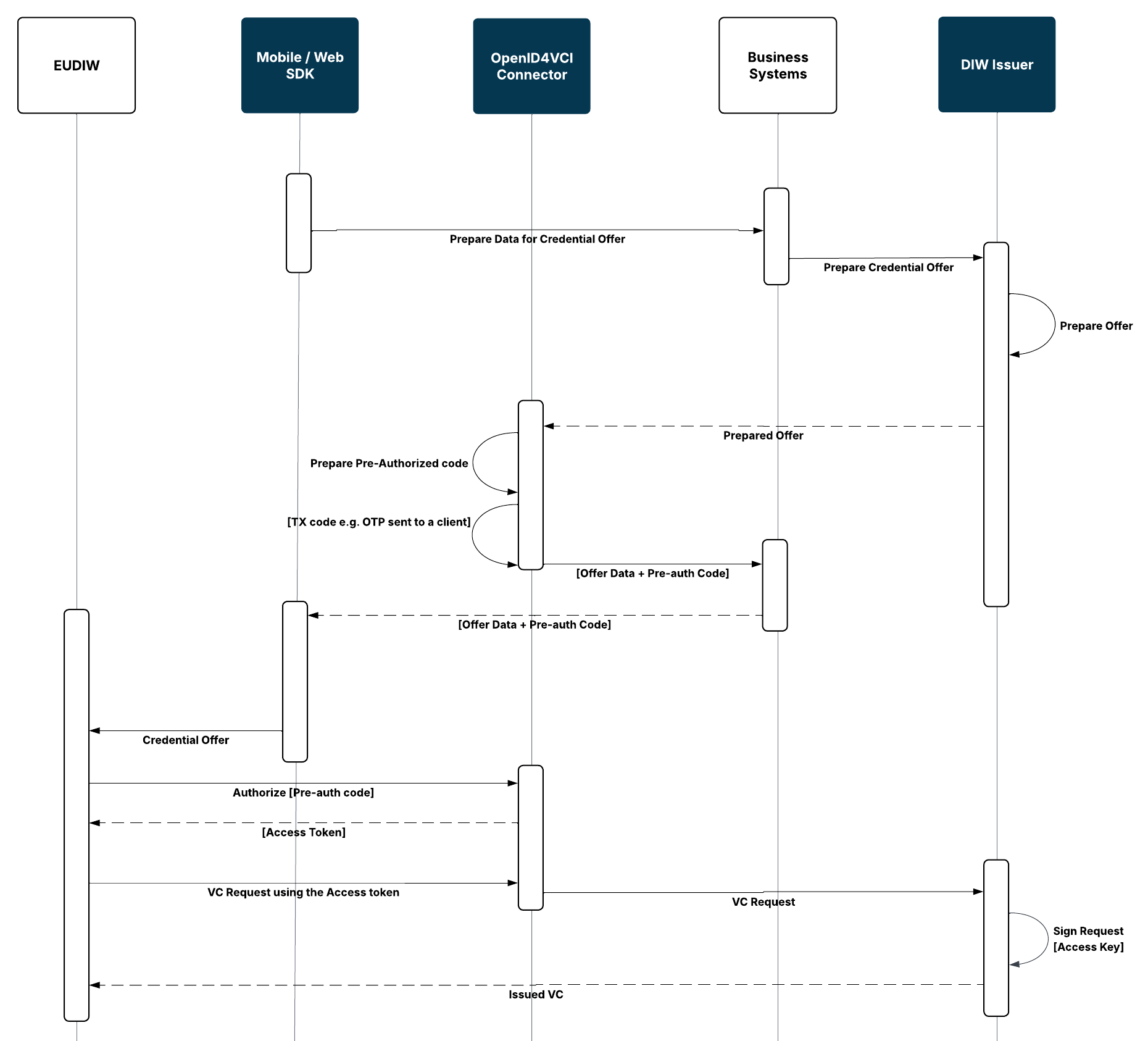
The Pre-Authorized Flow can be used when the issuance process is initiated for a user who has already been authorized by the integrating organization:
- The integrating system prepares the data required for issuing the attestation.
- The integrating system initiates an issuance transaction in DIW Gateway.
- DIW Issuer prepares Credential Offer.
- DIW Connector prepares a pre-authorized code.
- The Credential Offer is provided to the Wallet Unit.
- The Wallet Unit authorizes against DIW Connector and obtains an access token.
- The Wallet Unit requests the attestation through the OpenID4VCI Credential Endpoint.
- DIW Connector requests the attestation from DIW Issuer.
- DIW Issuer cryptographically signs the attestation.
- The attestation is returned to the Wallet Unit.
Authorization Code Flow Steps
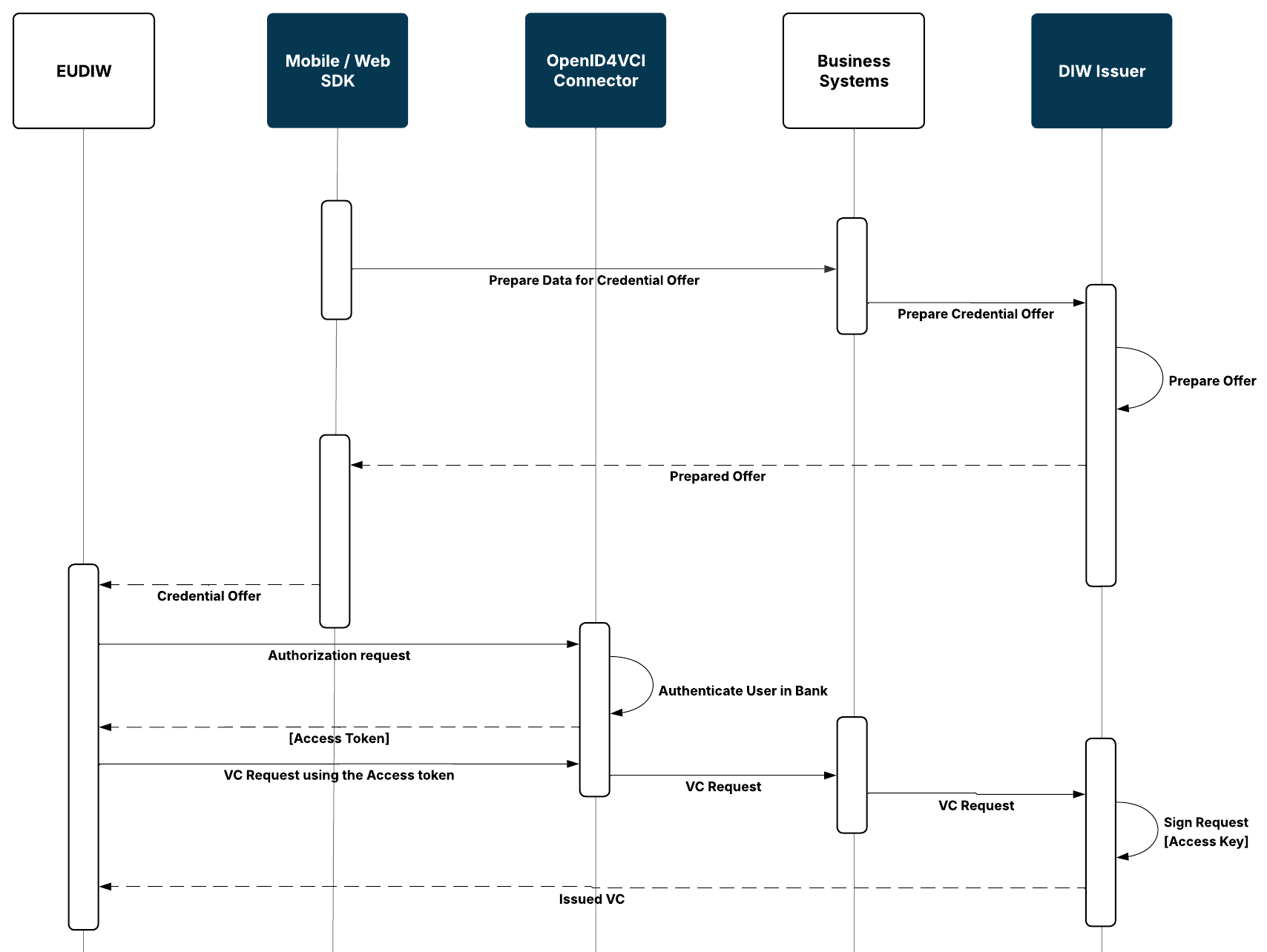
The Authorization Code Flow can be used when the user needs to be authorized as part of the credential issuance process:
- The integrating system prepares the data required for issuing the attestation.
- The integrating system initiates an issuance transaction in DIW Gateway.
- DIW Issuer prepares the Credential Offer.
- The Credential Offer is provided to the Wallet Unit.
- The Wallet Unit starts the OpenID4VCI authorization process through DIW Connector.
- The user is authenticated and authorized using the configured authorization process.
- After successful authorization, the Wallet Unit obtains an access token.
- The Wallet Unit requests the credential through the OpenID4VCI Credential Endpoint using the access token.
- DIW Connector processes the credential request and the corresponding issuance request is provided to DIW Issuer.
- DIW Issuer creates and cryptographically signs the credential.
- The issued credential is returned to the Wallet Unit.
Wallet-Initiated Issuance Integration
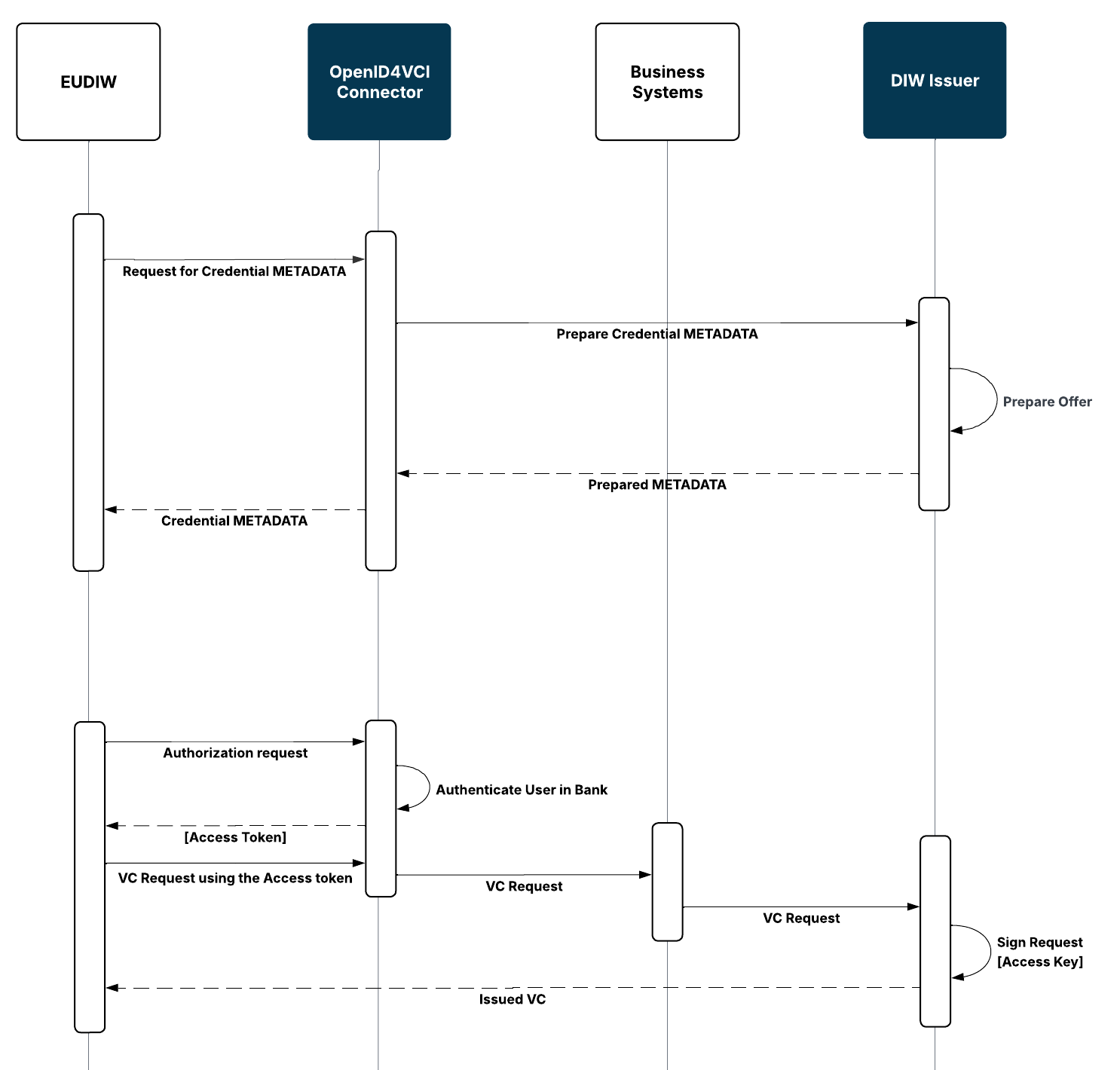
DIW Gateway supports Wallet-initiated OpenID4VCI issuance.
In this scenario, the issuance process is initiated from the Wallet Unit. The issuance continues using the applicable supported OpenID4VCI authorization flow.
A Wallet Unit may expose available Credential Issuers and credentials through its own user interface, for example as a catalogue. The specific discovery and presentation of available providers is handled by the Wallet Unit.
DIW Connector handles the authorization part of the OpenID4VCI issuance flow and the protocol communication with the Wallet Unit, while DIW Issuer creates and cryptographically signs the issued credential.
Using SUA for Authentication and Authorization
An SUA attestation issued to a Wallet Unit can subsequently be requested and verified as part of an authentication or authorization scenario.
DIW Gateway supports the technical mechanisms required for these scenarios, including the inclusion of the context of a specific transaction in the EUDIW flow.
Core Scenario Steps
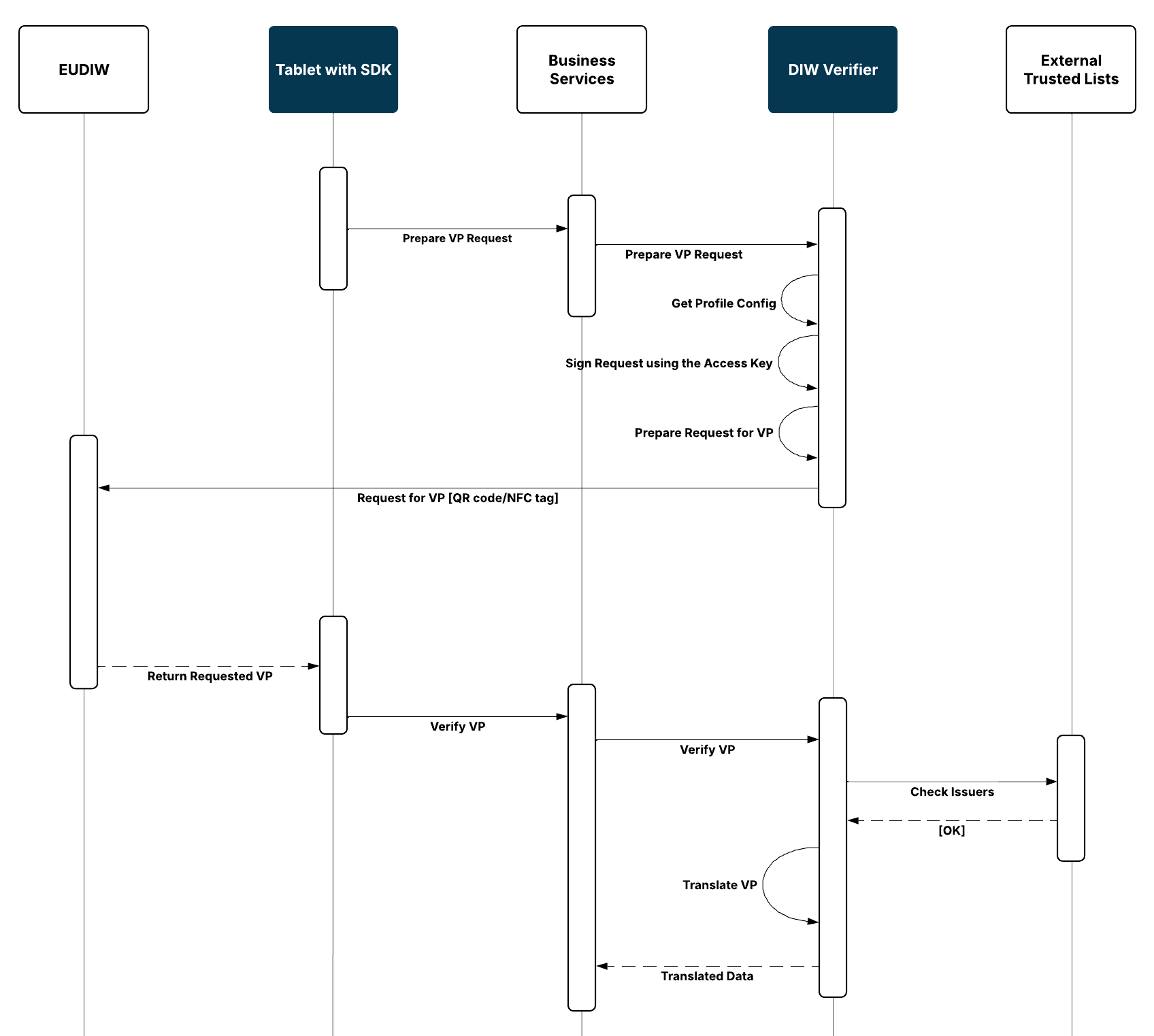
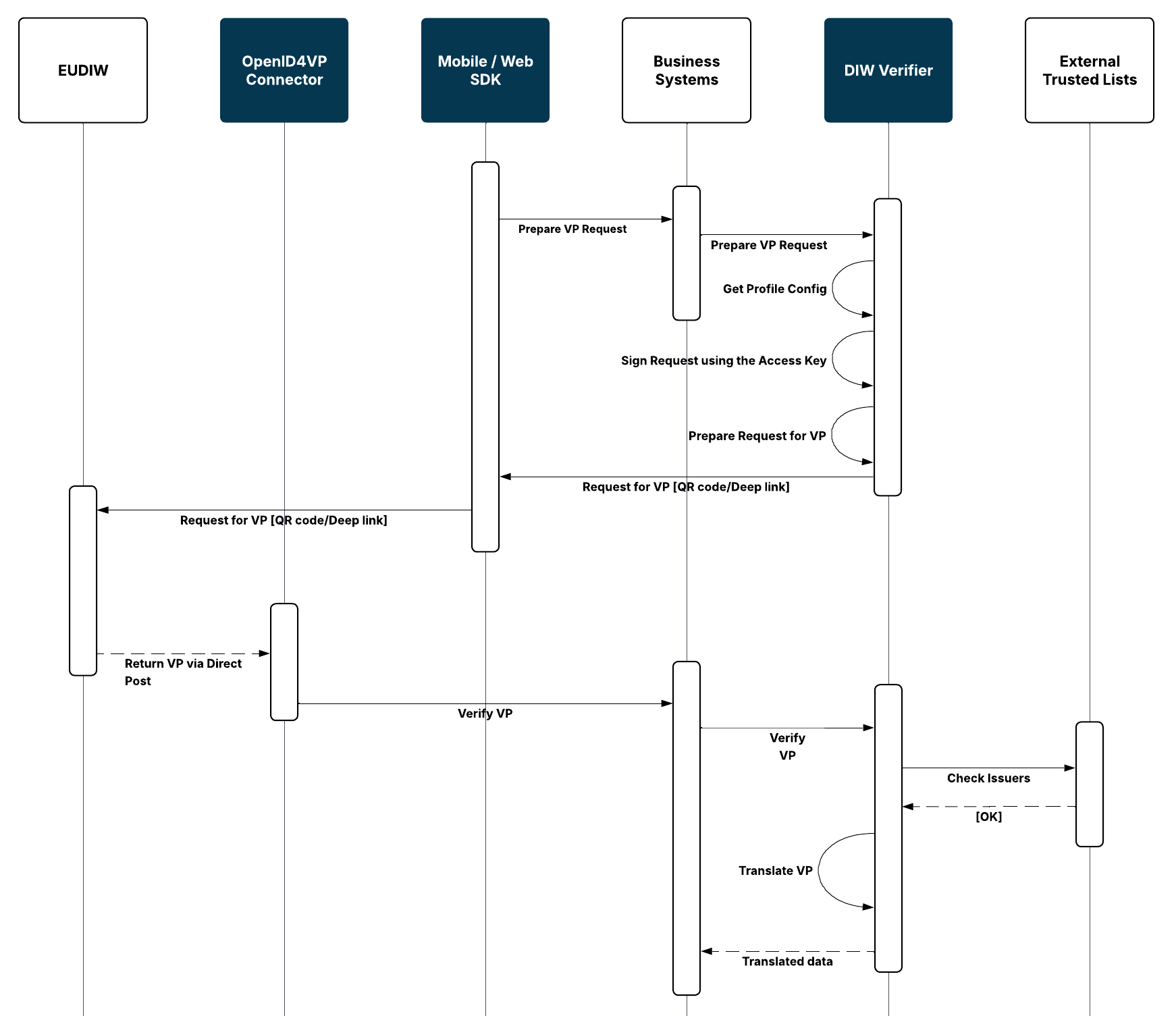
- Client system requests data from a Wallet Unit for a specific scenario.
- DIW Verifier prepares an authorization request for the scenario, includes transactional data, and signs the request using the access key.
- Communication with the Wallet Unit is initiated using the data returned by DIW Gateway.
- The user reviews and approves the requested presentation in the Wallet Unit.
- The Wallet Unit creates and returns the Verifiable Presentation.
- DIW Connector receives the response and passes the presented data to DIW Verifier.
- DIW Verifier performs the technical validation of the presentation and the contained attestations.
- DIW Verifier applies the configured mappings to the validated data.
- The validation result and mapped data are made available to the integrating system.
Local Integration
The local integration scenario supports in-person verification, for example at a branch using a tablet or another client device integrated with DIW Gateway.
The client application initiates a verification transaction and starts the Wallet Unit interaction using a supported local interaction mechanism, such as NFC, Bluetooth or a QR code.
The Wallet Unit presents the requested attestations, which are subsequently processed and verified by DIW Gateway.
Remote Integration
The remote integration scenario supports verification through digital channels, such as mobile banking or internet banking.
The client application initiates a verification transaction and starts the Wallet Unit interaction using a supported remote interaction mechanism, such as the Digital Credentials API (DC API), a deep link, or QR code.
The Wallet Unit presents the requested attestations, which are subsequently processed and verified by DIW Gateway.
Transaction Binding
DIW Gateway supports binding an EUDIW flow to the specific transaction or operation being authorized.
Transaction binding is implemented by including transaction data, or their secure representation in a signed JWT, in the presentation request and having the user confirm them in the Wallet Unit.
The response is cryptographically and transactionally bound to the corresponding request using nonce and state.
The relationship between the DIW Gateway transaction and the corresponding banking business process, as well as the evaluation of the received data, remains the responsibility of the integrating organization.
Dynamic Linking
For banking authentication and authorization scenarios, DIW Gateway supports dynamic linking that binds the user’s approval to specific transaction values, such as the amount and recipient.
The Wallet Unit also provides a WYSIWYG concept in which the user can see the information being approved as part of the flow.
Business Decision and SCA
DIW Gateway can provide EUDIW as one of the authentication or evidence inputs into a banking authentication or authorization process.
The evaluation of applicable SCA requirements and the final authentication or authorization decision remain the responsibility of the integrating organization.
For scenarios in which the Wallet Unit is used as part of SCA or the authorization of a banking or payment operation, a separate security, legal, and compliance assessment of the specific use case is recommended before production deployment.