
Attestation Verification
DIW Gateway enables Relying Parties to request and verify attestations presented by an EUDI Wallet. The verification process is handled by DIW Verifier together with DIW Connector. DIW Connector provides the OpenID4VP communication with the Wallet Unit, while DIW Verifier performs the technical validation of the received Verifiable Presentation and the contained attestations.
The technical validation performed by DIW Gateway is separate from the business decision made by the integrating organization.
Use Cases
- Identity Verification using PID - PID can be used as an identity input for scenarios such as digital onboarding, KYC/AML processes, user identity verification, and access management for existing users. For details, see Identity Verification using PID.
- Authentication and Authorization using SUA - the SUA attestation can be requested by a Relying Party and presented by the Wallet Unit as part of an authentication or authorization flow. For details, see Authentication and Authorization using SUA.
- Verified data for product application, like verifications of education, employment, and income for a loan application.
- Sharing product details via internal attestations for credit scoring.
- Sharing personal details via internal attestation for cross-selling.
Relying Party Registration
Before a Relying Party can use the Wallet Unit for user identification and authentication, it must be registered for participation in the EUDIW ecosystem.
For details about Relying Party registration and management, see Registered Entity Management.
Profile Concept
Profiles define which attestations and claims are requested from a Wallet Unit for a particular use case.
Each profile defines the credentials and claims required by a specific Relying Party and is associated with a particular use case. A profile can include multiple credential types from different providers.
When creating a verification transaction, the integrating system selects the profile corresponding to the required scenario.
Profiles support data minimization by allowing different use cases to request only the credentials and claims required for their purpose.
Only credentials and attributes permitted for the respective Relying Party can be requested.
Requesting Verifiable Presentation from Wallet Unit
The verification process starts when the integrating system creates a verification transaction through the DIW Gateway API and selects the profile corresponding to the required use case.
DIW Gateway prepares an OpenID4VP Authorization Request based on the selected profile and returns the data required to initiate the Wallet Unit interaction.
After the user approves the request, the Wallet Unit creates a Verifiable Presentation containing the requested attestations and returns it to DIW Gateway using the supported OpenID4VP response mode.
Core Scenario Steps
- Client system requests data from a Wallet Unit for a specific scenario.
- DIW Verifier prepares an authorization request for the scenario, includes transactional data, and signs the request using the access key.
- Communication with the Wallet Unit is initiated using the data returned by DIW Gateway.
- The user reviews and approves the requested presentation in the Wallet Unit.
- The Wallet Unit creates and returns the Verifiable Presentation.
- DIW Connector receives the response and passes the presented data to DIW Verifier.
- DIW Verifier performs the technical validation of the presentation and the contained attestations.
- DIW Verifier applies the configured mappings to the validated data.
- The validation result and mapped data are made available to the integrating system.
Local Integration
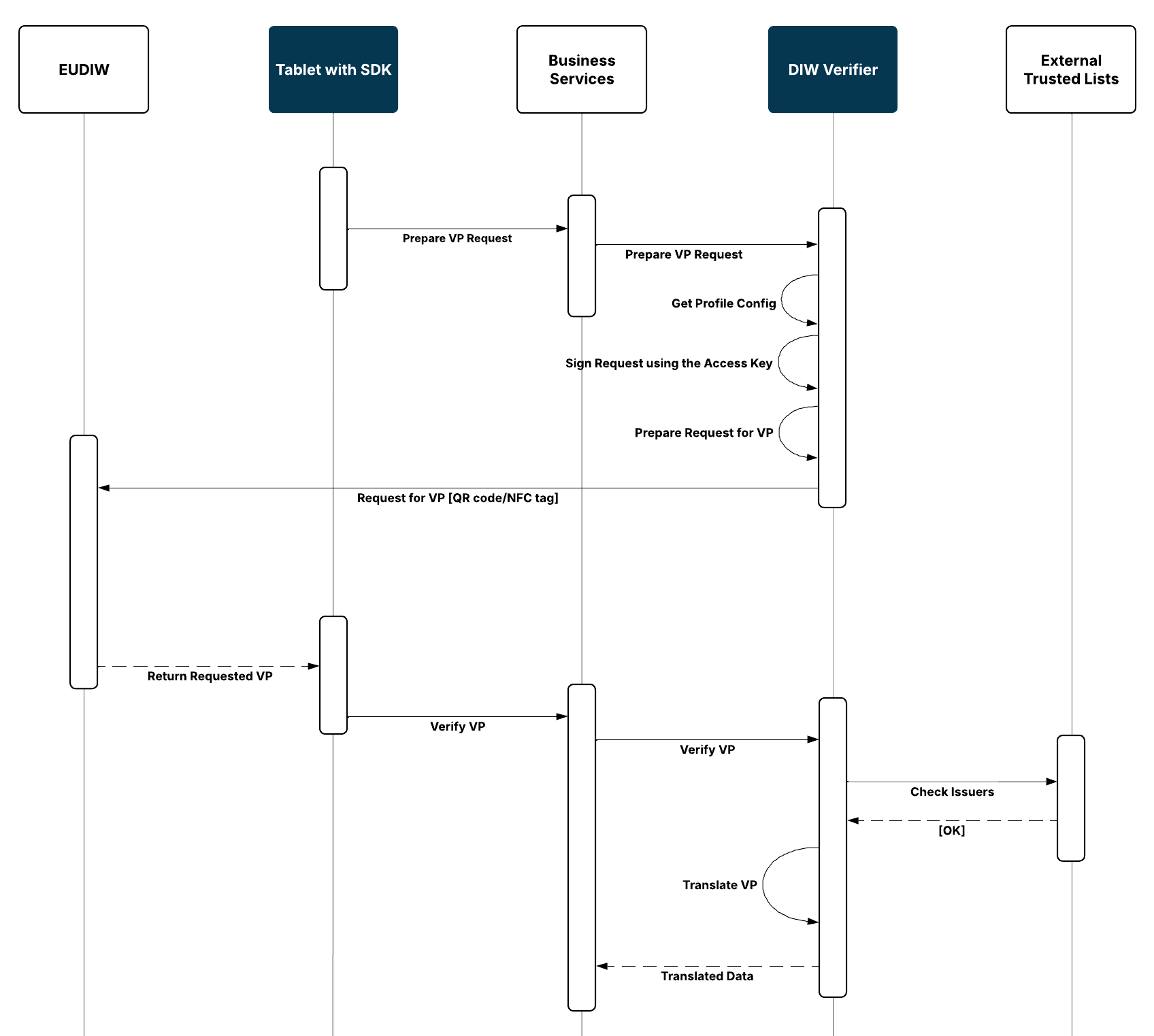
The local integration scenario supports in-person verification, for example at a branch using a tablet or another client device integrated with DIW Gateway.
The client application initiates a verification transaction and starts the Wallet Unit interaction using a supported local interaction mechanism, such as NFC, Bluetooth or a QR code.
The Wallet Unit presents the requested attestations, which are subsequently processed and verified by DIW Gateway.
Remote Integration
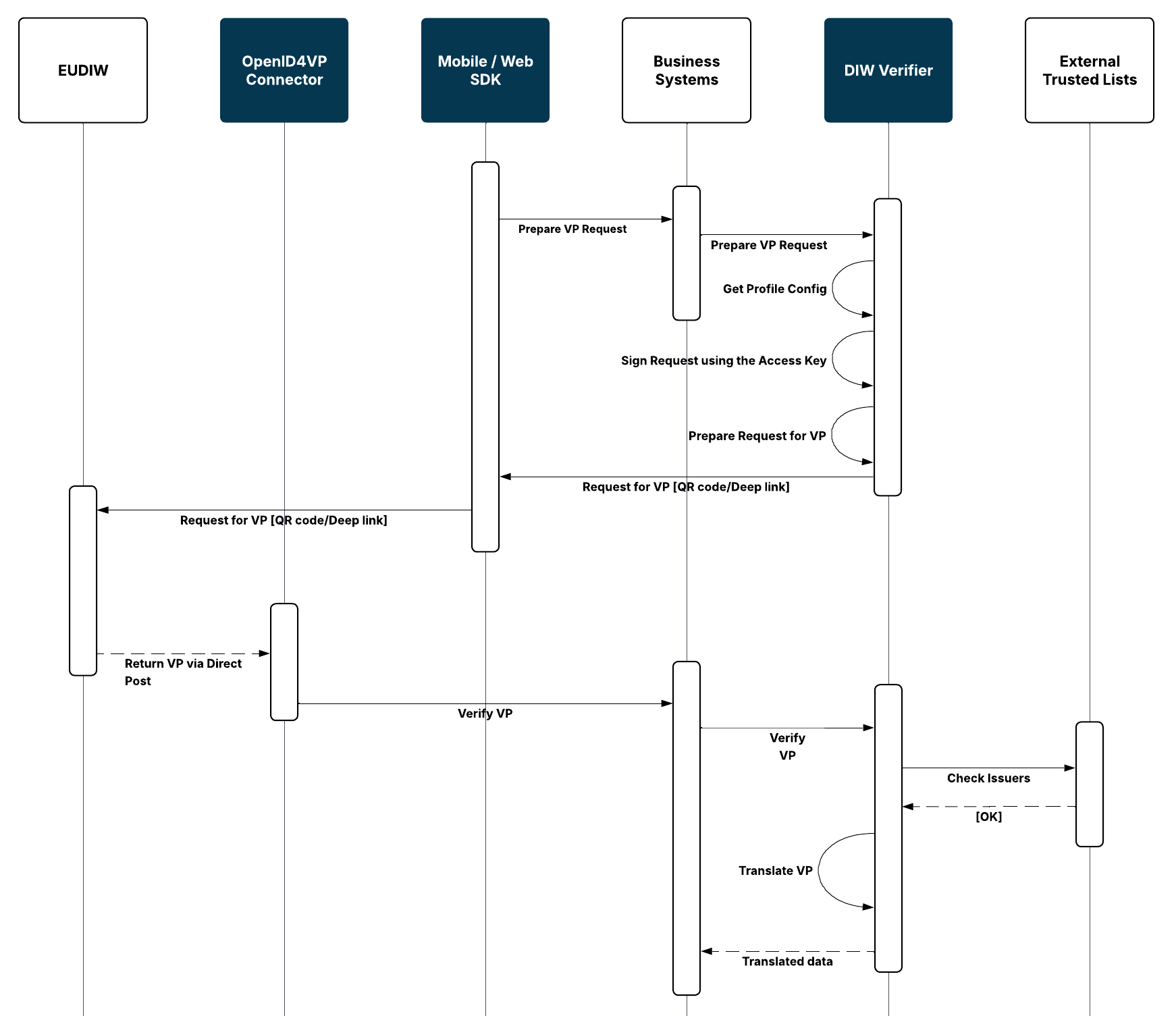
The remote integration scenario supports verification through digital channels, such as mobile banking or internet banking.
The client application initiates a verification transaction and starts the Wallet Unit interaction using a supported remote interaction mechanism, such as the Digital Credentials API (DC API), a deep link, or QR code.
The Wallet Unit presents the requested attestations, which are subsequently processed and verified by DIW Gateway.
Attestation Verification
DIW Verifier performs the technical validation of the Verifiable Presentation and the attestations contained in it.
The verification covers the cryptographic integrity of the presentation and credentials, their relationship to the corresponding protocol transaction, the trustworthiness of the credential Issuer, and the current status of the credential where applicable.
The technical validation result and validated data are subsequently made available to the integrating system.
Cryptographic and Trust Validation
DIW Verifier verifies the cryptographic proofs of the Verifiable Presentation and the contained attestations.
The verification includes validation of the Issuer’s signature against the applicable trust anchor and validation of the Issuer against the relevant EUDIW trust sources.
Where holder or device binding is required by the applicable credential format or profile, the corresponding proof is also verified.
For details about trust sources and trust validation, see Trust Framework & Trust Validation.
Status Verification
When DIW Verifier processes a Verifiable Presentation, it checks the current status of the presented credential, including whether the credential is still valid or has been revoked.
The status check is important because cryptographic validity alone does not guarantee that the business information represented by the credential is still current.
A change in the underlying business information may require the Issuer to revoke the existing credential.
Mapping Verified Data
DIW Gateway supports configurable mapping of received credentials and attributes into the canonical data model of the integrating organization.
The configured mappings are applied after the presented credentials have been technically validated. The resulting data can also indicate requested information that was not provided by the Wallet Unit.
Received Attestation Management
DIW Verifier maintains information about received attestations and their verification transactions.
The content of a Verifiable Presentation or credential is stored separately from the associated cryptographic material. Data retention is configurable, and presentation or credential content can be removed after the verification transaction while retaining the relevant cryptographic hashes for subsequent integrity verification.
DIW Verifier can also operate in a pass-through configuration in which presentation data is held temporarily during transaction processing and removed after it has been successfully provided to the integrating system.
View Verification History
DIW Gateway maintains a transaction and audit trail for verification activities.
The transaction state and technical validation results can be used to trace the processing of a verification flow. Relevant cryptographic material is retained to support subsequent ex-post verification, even when the original presentation or credential content is no longer retained.
Audit records can be accessed through the audit API.