
Product Overview
At Wultra, our Identity Verification solution seamlessly integrates the best ID verification and identification components directly into the customer’s identity creation process, providing a fully end-to-end digital experience. This approach enables our clients to implement the solution within their existing architecture or with their current technology vendor, without incurring unnecessary costs.
Leveraging top technologies and adapting to regulatory changes, Wultra delivers a modern and secure experience that meets AML and KYC requirements. It also strengthens protection against phishing and vishing by removing manual code entry, preventing attackers from taking over the targeted mobile app.
Key features include:
- Straightforward document scanning process, supported by real-time error messaging for optimal document positioning and document verification.
- Advanced face matching and liveness detection capabilities.
- SDK’s backed process, including identifying fake IDs and virtual camera usage.
- Full compliance with local regulations.
The solution supports use cases of new customer onboarding via ID document OCR and verification combined with facial biometrics, seamless access recovery or authentication step-up for high-value/high-risk transactions via facial biometrics.
All core components are available as Software as a Service (SaaS) or can be deployed on-premises. However, document verification and server-side biometry greatly benefit from running in the cloud. This allows for the easy adoption of new document types for document verification and the addressing of new attack vectors for server-side biometry.
High-Level Architecture
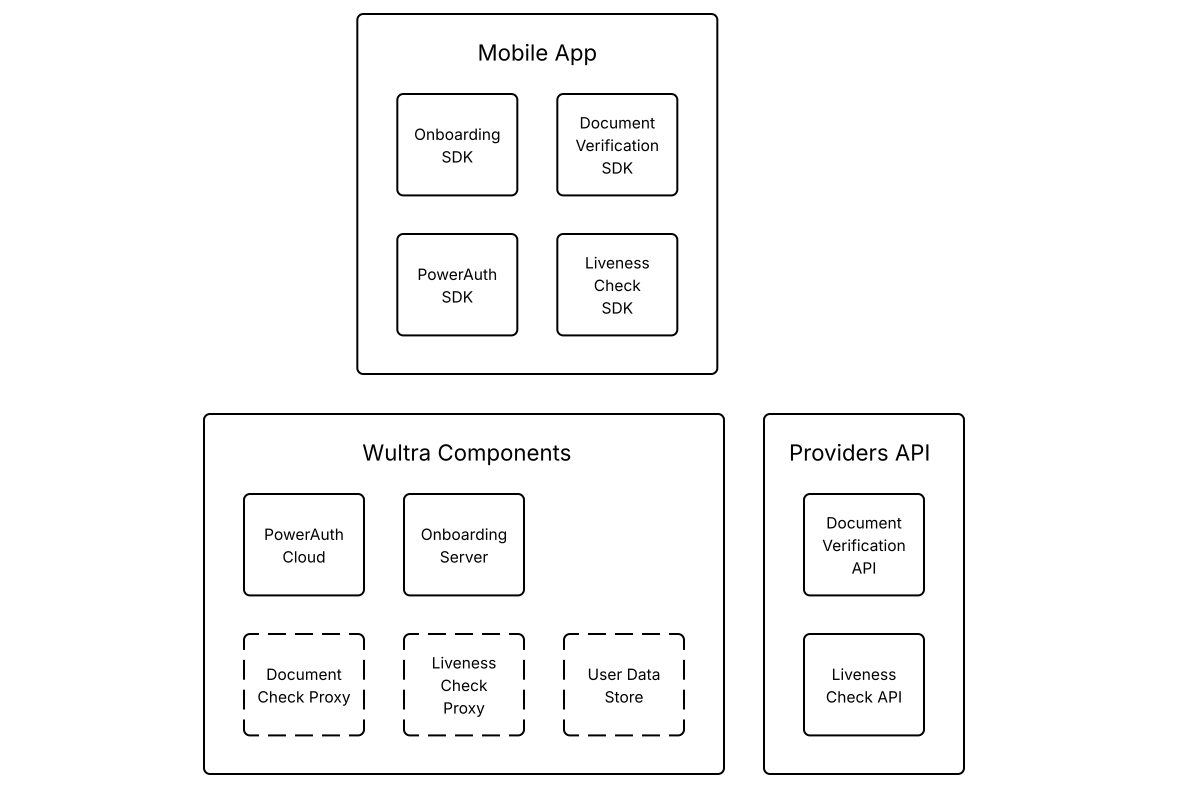
The proposed solution features an integrated platform that combines the best of security, document scanning and verification, and intuitive biometric verification.
Mobile Libraries
Digital Onboarding SDK
The SDK communicates with the Onboarding Server to execute process steps and provide process status so the mobile application can execute the proper screen flow. The SDK has a React Native bridge.
PowerAuth SDK
Currently used SDK for PowerAuth Mobile-First Authentication. The onboarding process activates the SDK. Also, it uses this SDK to add an additional layer of protection for data transferred between the mobile application and the backend servers. SDK has a React Native bridge.
Document Verification SDK
The React Native SDK itself doesn’t need backend servers to execute the extraction but conveniently scans the document and is also capable of providing local data extraction, so it could be in the screen flow to double-check data before sending the captured document scan to the backend for verification.
Liveness Check SDK
The React Native SDK captures the user’s face and sends the resulting image to the cloud API for verification. Communication can be optionally made via bank infrastructure using a reverse proxy. The SDK immediately provides the verification result by scanning, which could be used for screen flow management. From a security point of view, the verification result is read on the backend from the cloud API.
Backend Components
PowerAuth Cloud
This core PowerAuth component provides services for device enrollment and operations authentication in compliance with PSD2 requirements for Strong Customer Authentication.
Onboarding Server
This extended PowerAuth component serves as a connector for a mobile application. It allows the orchestration of the onboarding process on the mobile application. Based on PowerAuth’s cryptographic features, the component guarantees process and data integrity.
Liveness Check Proxy
Optional Component. The Liveness Check Proxy is used in cases when user liveness verification is not part of the onboarding or recovery flows, such as authentication step-ups.
Document Check Proxy
Optional component. The Document Check Proxy serves for cases when documents should be verified (or just extracted) outside the onboarding or recovery flows. For example, a user should upload a newly issued document when the old one expires.
User Data Store
Optional component. User Data Store is a Wultra default component for storing verified documents. This can speed up integration when the bank doesn’t have such a component ready. The component also serves as a default document storage used by the Liveness Check Proxy and Document Check Proxy.
Providers API
The Document Verification and Presence Check are provided by the Service Providers.
System Architecture
Security
Communication
All communication between components is protected by SSL/TLS. The mobile application endpoints provided by Onboarding Server employ end-to-end encryption to ensure that sensitive data remains encrypted throughout its lifecycle. This approach guarantees that data is only accessible by the server and protected from unauthorized access during transmission. All internal and external endpoints are protected by Basic or OAuth2 authorization. External components provide a means to rotate the credentials to mitigate the risk of credential leaks. The specific setup depends on the specific bank requirements.
Secrets
Sensitive configurations are managed via Docker environment variables, ensuring that secrets are not stored in plain text within the system. This enables credentials management via Kubernetes Secrets and mechanisms like Vault Secret Operator.
Encryption at Rest
All components expect transparent encryption on the database layer. Components like PowerAuthServer and UserData store enable additional application encryption, i.e., data are encrypted before persistence in the database by a discrete encryption key derived for the record. The KYC Process Service has the capability to encrypt sensitive data, but this has to be specified during the analytic phase.
Identity Management
All endpoints serving server-to-server communication are protected by Basic authentication or by OAuth Client Credential Flow. The OAuth2 protocol is expected for user access, i.e., access to the Case Management Console and Camunda administration. The console defines required permissions and entitlements for the functionality. The OAuth2 provider (like Entra ID) manages users and user-assigned roles.
Availability and Scaling
Any component in the system runs in a high-availability setup with disaster recovery. The application layer—i.e., pods are strictly stateless services, and synchronization, if needed, is done on the database layer. The database layer is expected to run in HA DR in at least an Active-Passive setup, but DB management is considered out of the scope of the response to the RFP.
Integration
The integration of the application components depends on the REST API. For asynchronous communication, the system uses REST Webhooks. No other technology is required. The connectors in KYC ProcessService can react to messages from Kafka or other messaging platforms, but this is not expected within the scope of this RFP.
Auditing and Monitoring
The systems work in standard layers:
- Application Logs
- Application Monitoring and APM
- Audit Logs
- Business Monitoring
Application Logs
All components provide structured logs to the standard output. Configuration can be changed by parameterizing the docker variable, but the recommended approach is sending logs to standard output. By default, the inline format is used, but as the application logging is based on SFL4J and logging is configurable, the format can be changed, for example, by adding a log stash encoder. All application logs contain standard tracing headers and can consume tracing headers on output and emit the tracing header when calling other systems to enable distributed log tracing.
Application monitoring and APM
The components provide a standard Spring actuator endpoint. This enables the standard connection of K8 health and readiness probes and integration with Prometheus. The component also has configurable micrometer tracing (by default, used for generating tracing headers) for tracers OpenTelemetry or Zipkin.
Audit Logs
The system keeps a full audit log of activities via the Wultra auditing library. The audit log is available in the database on a user basis via API. In addition, Camunda also keeps track of the activities of the process instance.
Business Monitoring
Business monitoring should be partially done on the application logs, and the KYC Process Service offers a Process monitoring dashboard as part of Camunda Tooling.
Data Residency and Data Retention
Components deployed on the bank are fully under the bank’s control, with all data and communication. The components either do not store data permanently or have data purging capabilities.
Performance Requirements
Based on the requested verification volumes, we expect a low number of requests per minute. The Enrollment Server Digital Onboarding component and KYC Connector Service can be deployed with sizing 4 vCPU and 6 GB RAM. No external volumes are required to run the docker image.
The KYC Process Service contains the Camunda engine, and the recommended setup is 2 vCPU and 3 GB RAM.
All components should be run in 2-3 instances to ensure high availability and disaster recovery capabilities.
Backup and Restore
The application layer is strictly stateless, and only the deployment pipeline should be backed up to enable new deployment to a new location in a disaster recovery scenario.
The underlying database should be backed up; the recommended approach is to complete a full backup regularly and, in parallel, forward the write-ahead logs (WAL) to different DR regions. In this case, RPO 0 can be reached. The exact DB strategy is in the bank’s governance based on the bank’s IT risk assessment of the KYC service.
System Parametrization and Configuration
The system parameterization consists of two major parts. One part focuses on process design and configuration. The process is designed using Camunda Console and Camunda products Modeler, Tasklist, and Connectors. This tool allows you to create or modify flows and attach required actions like external checks, user tasks, or automated rules. So, this is the component where the capabilities of the workflow engine built on Camunda are configured. The second part focuses on managing the Case Management console and integration settings. This part is configured on a technical level by Docker environment settings to ensure compatibility with any deployment type. Possible parameters are, for example, the OIDC server address, claim representing user roles, database connection URL…
Case Management
The Case management console serves two purposes. One is to manage the KYC process itself. This includes user task management (like assigning a task to a user) and user task execution (like manually approving the KYC process). This part is based on the Tasklist Camunda component. The second purpose is for post-process investigation - serving as back office or complaint officers. The console allows users to search for a specified client and see the details of his KYC cases with all data gathered from the document and face verifications.
Core Functions
| User Flows | Description |
|---|---|
| Customer Onboarding | If you need to onboard a new user who doesn’t have an existing connection with the bank, we provide all the necessary functionalities, such as consents, document verification, presence checks, and optional OTP’s, through a secure communication channel. |
| Mobile App Registration | This is the flow for cases where you need to onboard an existing user again, for example, if their device is lost or stolen. This process is similar to the standard onboarding process, but some steps can be skipped if necessary. |
| Authentication Step-Up | Secure your high-value, high-risk transactions with an additional face biometric verification that compares the user’s captured face with a trusted image. |