
Process Description
This page describes the complex onboarding process used for Customer Onboarding and Mobile App Registration flows.
Wultra implements the critical process of onboarding, which is provided on the mobile platform by Wultra’s SDK:
- SDK will be integrated into the existing providers application and provide onboarding and Strong Customer Authentication (SCA) on the device. The whole onboarding process is designed as a mobile only
It’s important to note that the process boosts security by:
- Adding a step that cannot be phished out easily - while the user can pass it easily, there’s no information the user gives away to the attacker
- Capturing the photo of a person using the device on which the registration takes place (which is, on its own, a protective measure)
The digital onboarding process consists of a set of checks and validations in a flow designed to maximize the conversion rate while keeping up with regulatory (KYC and AML) and internal security requirements
Process Diagram
The diagram below illustrates all the steps in the process. The core functionalities are document OCR with verification and liveness checks (server-side biometrics), and we provide additional optional functions such as consent or one-time passwords.
The system calls services that should be implemented by the client. Most of these services are optional, except for the User Lookup Service, which returns a User ID to enable the client to establish a connection between the onboarding process and their own user database.
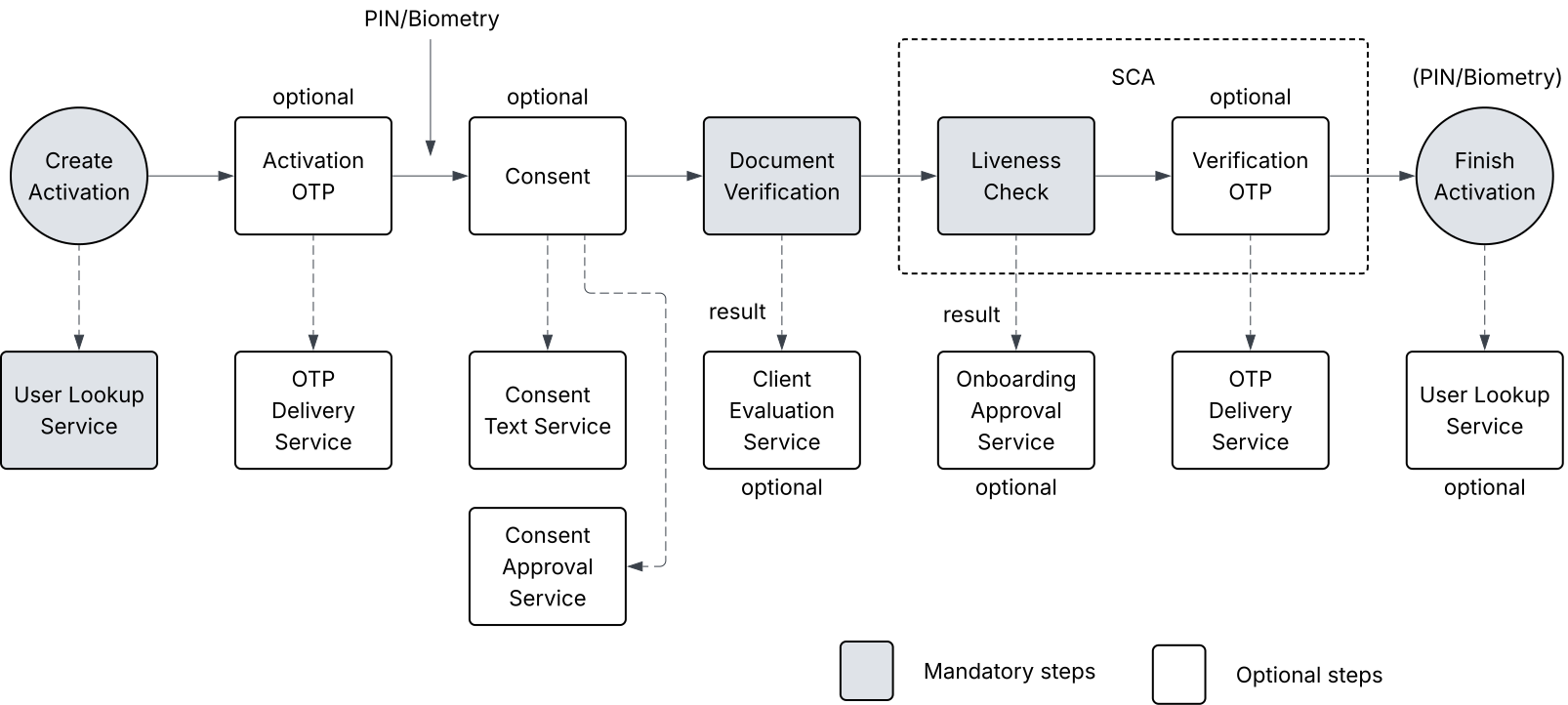
The user journey can be amended and will be finalized during the analysis phase.
State Diagram
Activating a new mobile application (e.g., an existing customer with a new phone) uses the same core components of ID scanning and verification and liveness detection. In this scenario, the components are combined to check an existent identity and are typically combined with SMS OTP.
It’s important to note that Digital Onboarding boosts security by:
- Adding a step that cannot be phished out easily - while the user can pass it easily, there’s no information the user gives away to the attacker.
- Capturing the photo of a person using the device on which the registration takes place (which is, on its own, a protective measure).
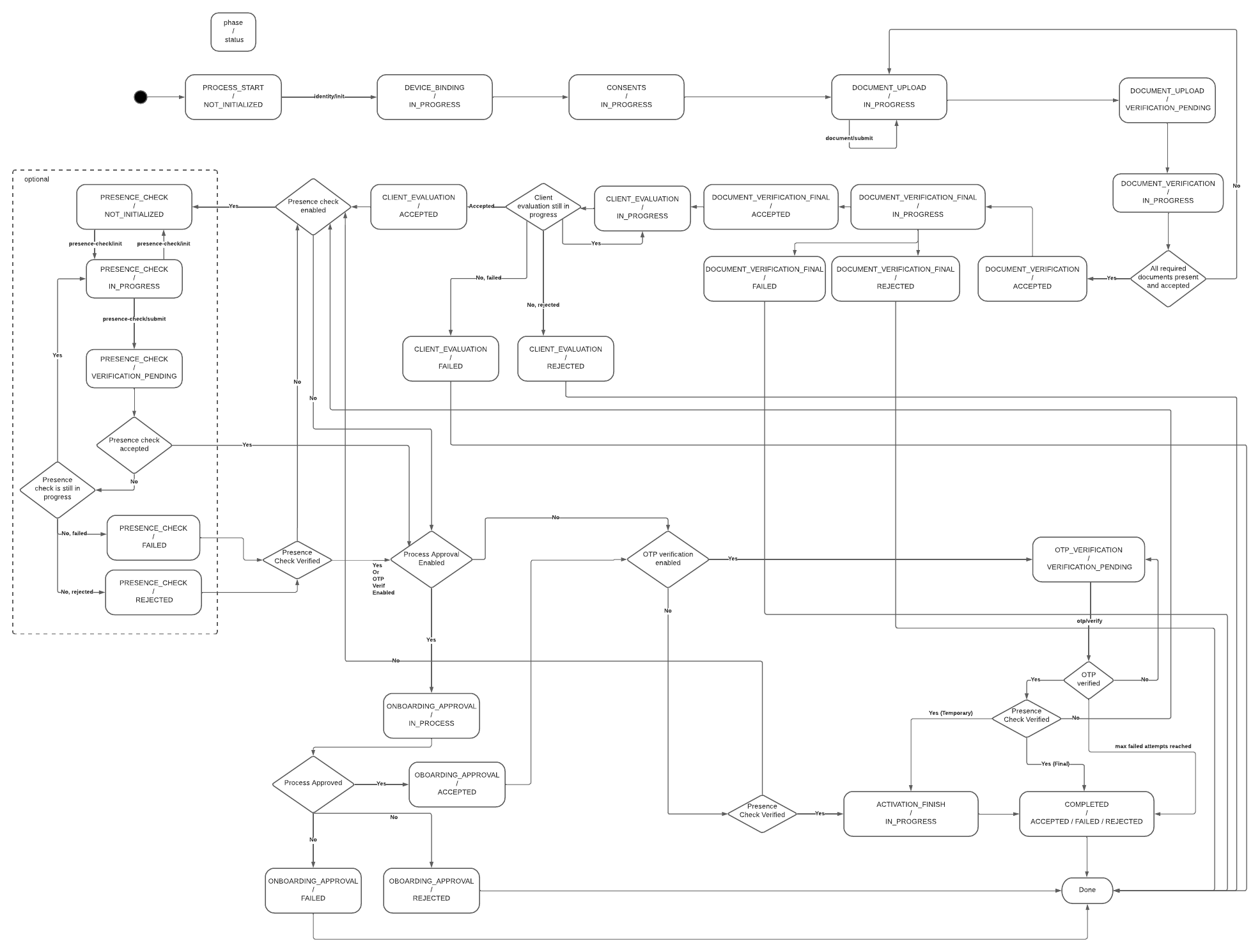
Mobile App Activation Flow
The KYC process itself is driven by a mobile-facing component called the Onboarding Server. This ensures that the mobile application (represented by the Onboarding SDK) is informed of the current and next steps in the process, enabling it to display the appropriate screen.
For simplicity, the KYC itself is split on the mobile phone to follow subsequent phases.
- Initial Identification
- Document Verification
- Presence Verification
- Final Verification
In the Initial Identification phase, the Onboarding Server gets the configuration from the KYC Process Server:
- Way to initially identify a user (OTP verification, username, technical identifier)
- List of consents to display for the user
- Which documents should be gathered in the process
- Optional additional OTP verification after the end of the verification process
- Checks and controls (number of allowed failed attempts, daily total attempts per user, etc.)
In Document Verification, the mobile app gathers the required documents per process type configuration and uploads the document scan to the Onboarding Server. The Onboarding Server checks the document with the Cloud API and uploads the result and extracted data to the Client Evaluation Service. After the signal from the KYC processing to approve (or reject) the attempt is received, the process continues.
In the Presence Verification phase, a similar logic applies to face verification. Onboarding Server initiates the verification session with Liveness Check SDK, informs the mobile application, and, after the face is scanned in the mobile application, verifies the result with the Cloud API. After that, inform the Onboarding Approval Service about the result and wait for approval.
After approval, if configured, the SCA signature from the client verifies the remote transaction of the digital onboarding and client.
Onboarding Stages
The onboarding process is divided into three distinct stages.
| Stage | Description |
|---|---|
| User Identification | The user identification flow collects basic user and AML/KYC data, retrieves the required configuration, and starts a new process using user credentials. A semi-optional lookup can validate the user and determine consent needs. If OTP verification is required, it’s sent and entered to create the registration. The user then completes registration by setting a PIN. |
| Identity Verification | The identity verification flow collects user consent, verifies documents, and optionally evaluates client data. Presence and biometric checks are performed, followed by optional onboarding approval. An OTP may be sent for strong customer authentication if required. |
| Device Registration | Device registration differs by type: flagged registrations simply remove the verification flag, while temporary registrations finalize the user ID, create a new registration, and complete PIN/biometric setup. Both types can optionally trigger a process event. The flow concludes with the success screen. |
Process Configuration
The system offers various configuration options. Those options relate to the entire process (all three stages combined), a specific stage or a specific operation within a stage.
Configuration can be found at two places:
- Configuration properties
- Database configuration
Configuration properties
This is mostly system or technical configuration of default values, timeout/expiration thresholds and other numeric values.
See the complete reference of configuration properties for Onboarding Process Configuration and Identity Verification Configuration.
General settings
General configuration of the Onboarding Process:
- Maximum number of onboarding processes during last 24 hours per user
- Maximum failed attempts for Identity Verification stage
- Maximum failed attempts for document upload
- Maximum error score for an onboarding process
Each action is assigned a weight, and failing increases the overall error score. The process fails when the score reaches the limit. The table below shows the actions and their respective weights that influence the score.
| Comment | Weight |
|---|---|
| OTP verification failure during user identification. | 1 |
| Document verification results in a FAILED state. | 1 |
| Document verification results in a REJECTED state. | 2 |
| Each failed presence check / OTP verification. | 2 |
| Identity verification reset occurs. | 3 |
OTPs
Configuration of parameters for Activation or Verification OTPs:
- Length of generated OTP codes
- Expiration time
- Maximum number of failed attempts
- Time period after which next OTP can be sent
Expiration
The system will periodically terminate processes if one of the following time limits is reached:
- Time limit for entire onboarding process
- Time limit for identity verification stage
- Time limit for activation OTP
Data retention
Configuration of data cleanup job:
- Retention duration for personal data collected during Identity Verification stage
Database Configuration
This is JSON configuration stored in database. It reflects different onboarding flows (like onboarding, reactivation, re-KYC,…) and tells which steps within the process is turned on or off. It also contains configuration of the required documents.
See the complete reference of configuration JSON for Onboarding Process Configuration.
General process logic
General logic configuration of the Onboarding Process:
- Process enabled
- Usage of Flagged or Temporary Registration
- Some details related to re-KYC flow (used flags, behavior when the process fails or expires…)
Steps that can be turned on/off
Configuration of the distinct steps within the Onboarding Process:
- Activation OTP/Identification OTP (requires OTP Delivery Service)
- Consent (requires Consent Text Service and Consent Approval Service)
- Verification OTP (requires OTP Delivery Service)
- Client Evaluation Service call
- Onboarding Approval Service call
- Presence check OTP (requires OTP Delivery Service)
Documents configuration
You can create unlimited number of document groups. Each group contains documents with specified type (ID_CARD, PASSPORT, DRIVING_LICENSE…), number of sides for scanning (1 or 2 sides) and country (eg. CZE).
Group configuration also contains minimum number of required documents within the group. It allows you to specify the documents required and gives the user the option of selecting their preferred document from the group.