
PowerAuth Architecture
The PowerAuth Cloud (PAC) bundles all functionalities for software mobile token and hardware mobile token for an easy deployment and setup. PowerAuth Cloud provides all functionalities from device activation and management to authorization code verification and operation approvals.
PowerAuth Cloud Architecture
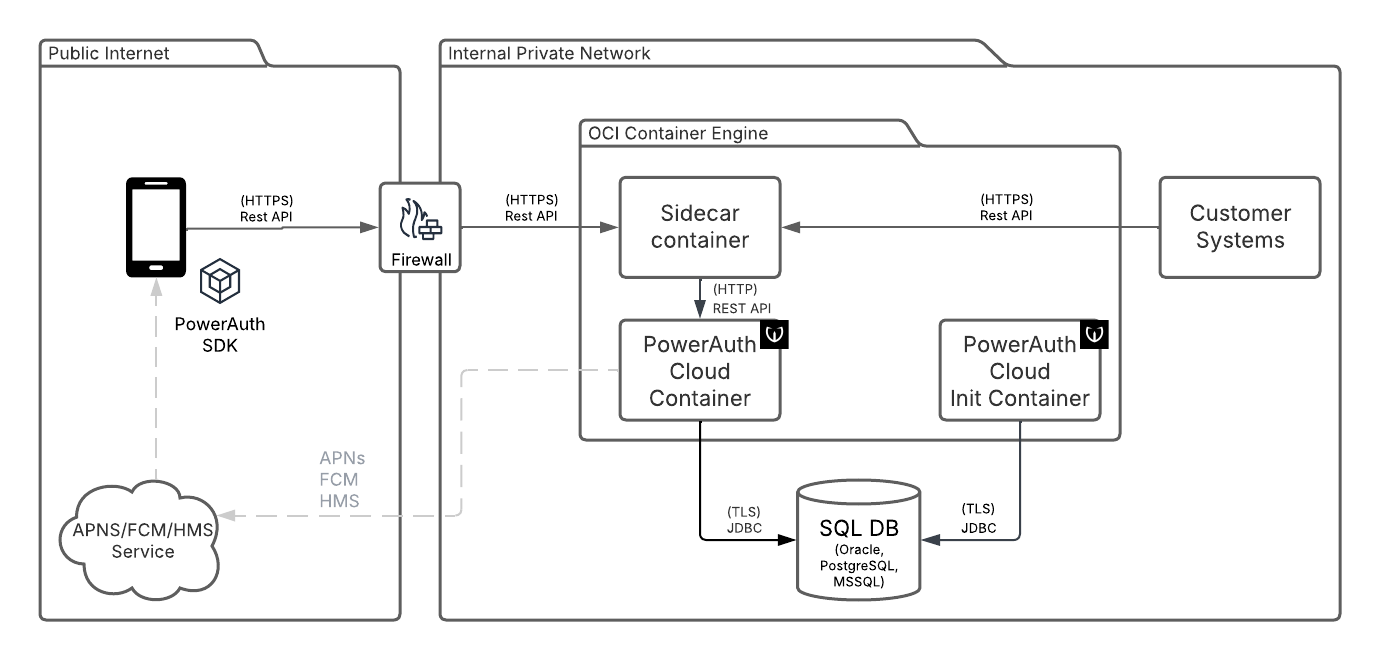
PowerAuth Cloud Container
The container with PowerAuth components.
SQL DB
Required external service. SQL compatible database. PostgreSQL, Oracle and MS SQL in LTS releases are supported.
Customer Systems
The external systems calling the REST API of PowerAuth Cloud Server. The integration is REST call to PAC, with optional callbacks to Customer Systems.
PowerAuth Cloud Init Container
The PowerAuth Cloud can be optionally deployed with init container. Wultra supplies the init container containing Liquibase database update scripts. The usage of the init container allows better control of deployment and also separation of a database user for schema modification from a user for application runtime.
Sidecar Container
The PowerAuth Cloud can be accessed via a sidecar container for advanced ingress management. This depends on the specific deployment and is not provided by Wultra.
PowerAuth SDKs
The PowerAuth SDK and Mobile Token SDK providing functionalities in the mobile application.
APNS, FCM, HMS
The Apple Notification Service, Firebase Cloud Messaging and Huawei Messaging Services - major platform Push Notification providers.
PowerAuth Cloud Console Architecture
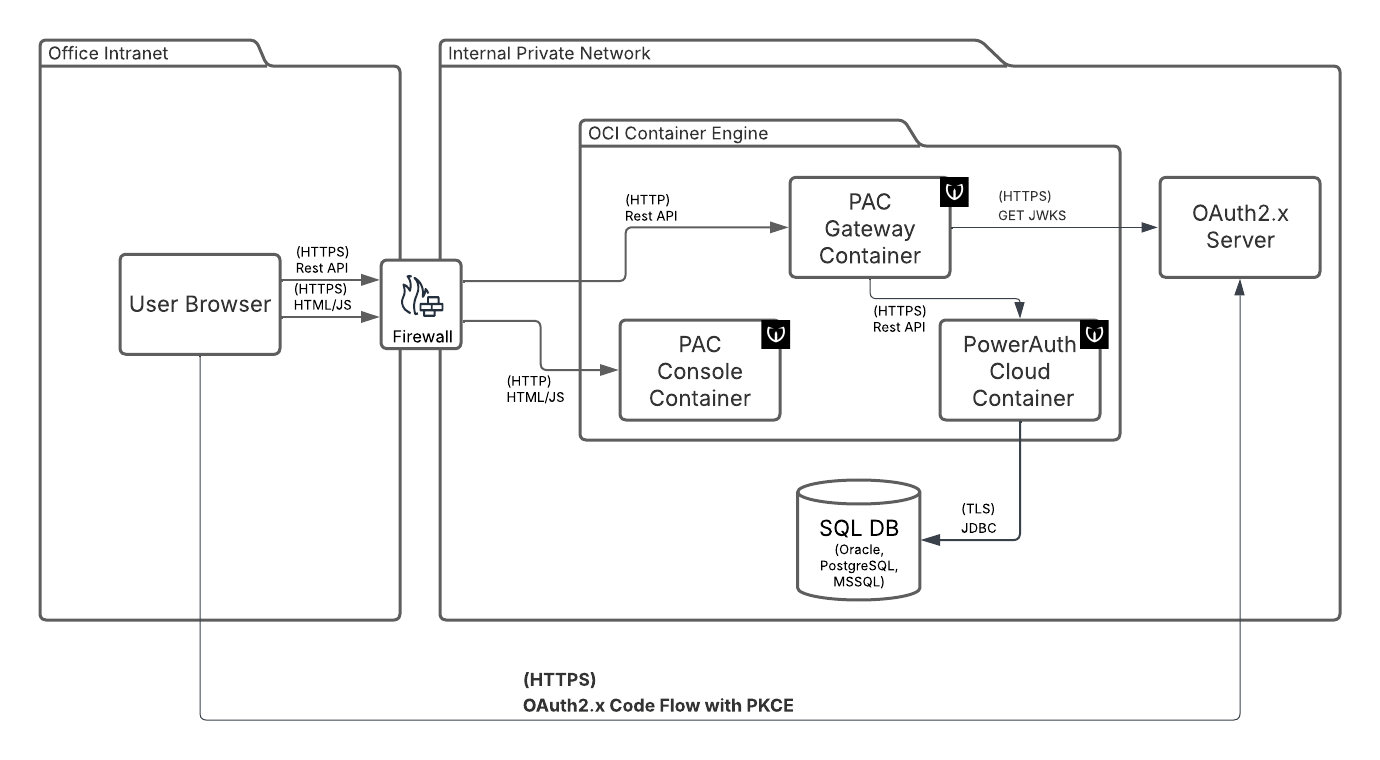
The PowerAuth Cloud can be deployed with optional UI. The console allows the similar functionalities as the server 2 server API. This setup has these additional components:
PAC Gateway Container
PAC Gateway serves to decouple UI from pure server API. The gateway:
- Authorizes the personal account using OAuth.
- Expose only selected API with additional role base access control (RBAC) suitable for personal accounts.
- Injects caller ID to respective API to enrich audit log.
- Provides translation of device info parameters from machine codes to human-readable names. Communication between Console and the PowerAuth Cloud Connector is authorized by system user.
PAC Console Container
The container serving static HTML and JS files for the UI. The UI itself runs as Single Page Application (SPA) in a client browser.
OAuth 2.x Server
OAuth 2.x authorization server. The server must provide OAuth core functionalities, supports OAuth public client (the SPA), issue access token in JWT format, expose JWKS endpoint for token verification. The SPA uses PKCE to assures integrity as public client.
Internal Architecture
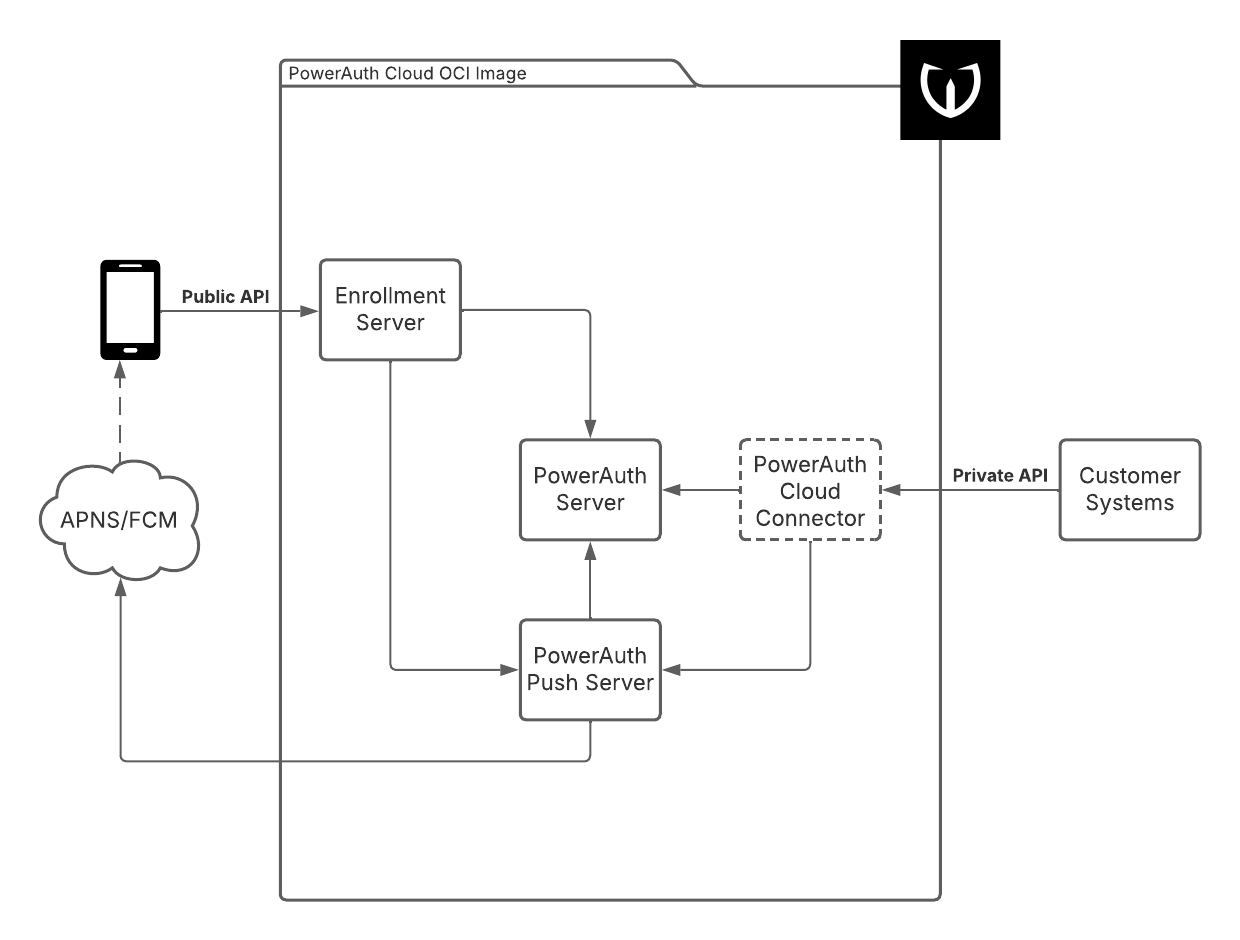
While the application is packaged as a simple Docker image, there are multiple components bundled inside of it. The following diagram provides a basic overview of those components.
Published Components
- Enrollment Server - Application published to the public internet via the
/enrollment-servercontext that is accessed by the mobile clients. - PowerAuth Cloud Connector - Proxy application available from the internal network published via
/powerauth-cloudcontext, should not be published to the public internet. Access is protected with basic HTTP authentication.
Internal Components
- PowerAuth Server - Docker-internal application responsible for device registration, registration lifecycle, signature verifications and operation approval.
- PowerAuth Push Server - Docker-internal application responsible for sending push messages via APNS, FCM, and HMS.