
Product Overview
Mobile-First Authentication by Wultra, also branded as PowerAuth, is a system designed to provide multi-factor authentication (MFA), ensuring compliance with the most stringent global regulatory requirements for secure authentication. This includes Strong Customer Authentication (SCA) under PSD2 in the European Union, as well as other relevant security regulations and standards worldwide.
Key features
- Secure Binding - Each device is authenticated and bound to the server securely, enabling trusted communication between the mobile app and the backend system.
- Operations Approval - For each business transaction, the system creates an operation that the user must approve, ensuring that the bank can trust the transaction’s legitimacy and that the authenticated user initiated it.
- Face ID Support - Easily log in and approve payments with facial biometrics.
- Message Inbox - Communicate with your customers via real-time messages.
- Secure PIN code - Enforce a strong PIN and don’t leave a trace of it in memory.
- Offline mode - Approve operations even if a mobile device doesn’t have signal.
High-Level Architecture
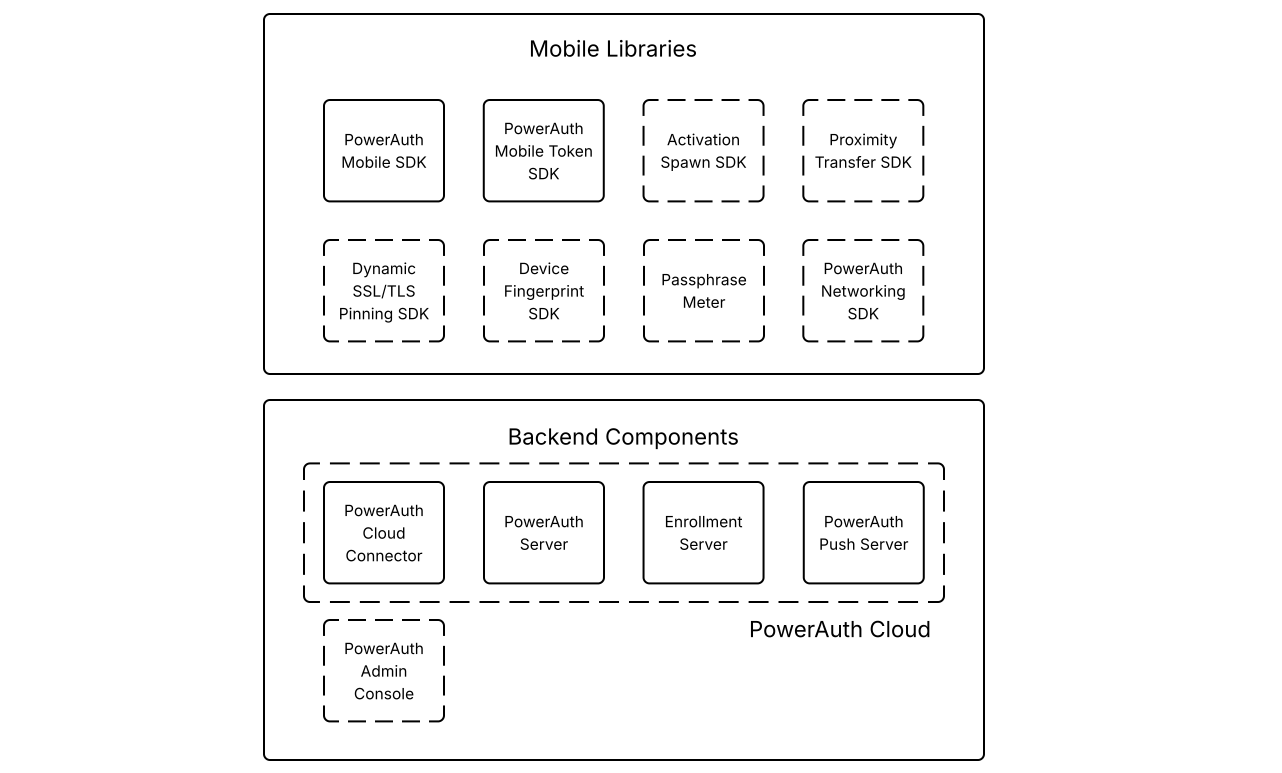
Wultra’s authentication solution consists of backend components and SDKs that can be easily integrated into mobile applications. These components work together to provide secure authentication services and ensure smooth communication between mobile applications and backend systems, leveraging the PowerAuth protocol for strong customer authentication (SCA).
Backend Components
PowerAuth Cloud Connector
The component provides the private API on the /powerauth-cloud context. A trusted customer backend system calls the
private API. Its primary function is to manage user registrations and initiate operations such as device activation or
authentication requests. Communication is secured and requires Basic Authentication or OAuth 2.x authorization before
other systems can interact with it.
PowerAuth Server
The core back-end component and counterpart of PowerAuth Mobile SDK, it is responsible for device registration, activation lifecycle, application management, operation approval, and signature verification.
Enrollment Server
This component exposes the public API under the /enrollment-server context that facilitates communication between mobile
SDKs embedded in mobile apps and the backend system. Unlike the Private API, the client (or mobile app) does not need to
interact directly with the Public API. Instead, it serves as a standardized interface for secure communication via the
PowerAuth protocol.
The enrollment server publishes the following services:
- PowerAuth Standard RESTful API
- Push Registration API
- Mobile Token Operations API
PowerAuth Push Server
PowerAuth Push Server is an optional application that facilitates sending APNs / FCM/ HMS messages alongside the PowerAuth Server installation. It uses PowerAuth Server to obtain information about users and device activation state and to provide extra security features.
PowerAuth Admin Console
The Admin Console Gateway is packaged as a single Docker image that you can deploy in your local environment or any cloud provider, such as Azure by Microsoft or Amazon’s AWS.
Mobile Libraries
Wultra provides a set of SDKs that can be integrated into the client’s mobile application. These SDKs handle various tasks related to device activation, operation signing, and other tasks related to the authentication lifecycle.
PowerAuth Mobile SDK
This SDK provides essential features for authentication, device activation, and data signing in mobile apps. SDKs are available for both iOS and Android, as well as React Native Bridge.
PowerAuth Mobile Token SDK
This SDK is built on top of the PowerAuth Mobile SDK. It communicates with the Mobile Token API and helps you integrate out-of-band operation approval into an existing mobile app.
Activation Spawn SDK
This SDK installs and activates another application’s PowerAuth instance from an already activated mobile application. This process eliminates the need for the user to go through the onboarding process again. The activation spawn process relies on a service within the main application to fetch an activation code and pass it to the secondary application for activation.
Proximity Transfer SDK
The SDK secures data transfer between two devices in close proximity using Bluetooth and QR scanning. It is typically used for a seamless new device activation using the old(activated) device.
Dynamic SSL/TLS Pinning SDK
This SDK manages a dynamic list of SSL/TLS certificates that are fetched from a remote server. All entries are signed with a private key on the server side and validated in the client side using the public key, ensuring that all certificates are validated using public key (we’re using the ECDSA-SHA 256 algorithm).
This optional solution provides an easy-to-use fingerprint validation on the TLS handshake, enhancing security for mobile app communication.
Device Fingerprint SDK
The SDK generates a unique device fingerprint based on device-specific attributes such as carrier, operating system version, and hardware details.
PowerAuth Networking SDK
A high-level networking SDK that simplifies communication with PowerAuth-based endpoints in mobile apps.
System Architecture
The infrastructure elements utilize managed services to ensure seamless integration and automated solutions for availability, backups, and scaling. The platform is capable of functioning in single-tenant modes.
This section provides an overview of the architecture and security measures we use to ensure reliability and scalability. If the client has specific requirements or needs adjustments to this architecture, we can collaborate to make the necessary changes.
The solution can be deployed on-premise, in the client’s cloud infrastructure, or provided by Wultra as a SaaS.
Gateway Layer
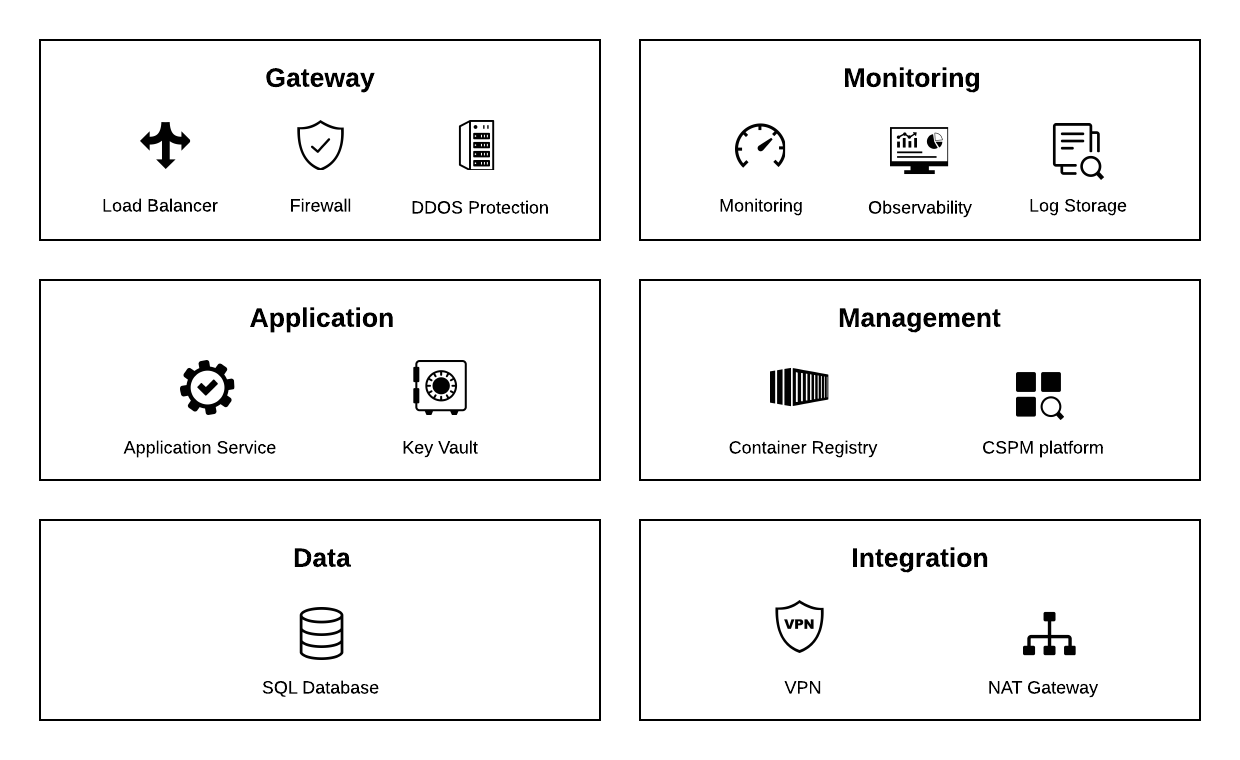
This domain resides in an isolated network and enables inbound traffic with external systems and end users via the Internet. The main component is an Application Gateway providing these three capabilities:
- Load balancer
- Web application firewall (WAF)
- Distributed Denial of Service Protection (DDoS)
The load balancer monitors the health and load of backend pools to ensure the high availability of the external APIs. Web application firewall (WAF) scans the traffic to identify and prevent attacks defined by the Core Rule Set (CRS) from the Open Web Application Security Project (OWASP). DDoS Protection offers help to prevent distributed denial of service (DDoS) attacks on application, transport and network levels defined by the OSI model.
Application Layer
This domain is used to deploy components that provide platform core services. Container management system is capable of running, scaling and monitoring Docker containers with the PowerAuth application. For secure configuration, vault is used to store and manage infrastructure secrets securely.
Data Layer
Managed SQL database is used as persistent data storage for the application layer.
Monitoring Layer
This domain provides centralized monitoring of the platform. It can be built on the native capabilities of the cloud provider or using open-source tools like Prometheus. For the observability, we recommend industry-widely adopted open-source Grafana stack. The logs can be replicated or forwarded to additional external solutions.
Management Zone
Various tools for platform management are part of the management zone. Container Registry is used by CI/CD pipelines to deploy new application versions.
Integration Zone
This domain allows additional security of the transport layers toward the customer networks by establishing VPN tunnels to ensure a private and secure connection.
Technical Architecture
Docker Deployment
Our backend components are packaged as a single docker image that can be easily deployed on-premises or in your cloud.
When installing the authentication backend, you need to perform several tasks:
- Pull the Docker image from our Artifactory repository
- Configure the environment
- Run the Docker image
- Setup the first system users
- Create an application and assign the permissions
- Configuring push notifications
System Requirements
The HW requirements for the default Docker images will be able to run the software nicely. The images run fine on most container management platforms in multiple instances. For production setup, we recommend running in two instances at least to achieve high availability.
Integration Patterns
The default integration method involves consuming the Wultra API in a synchronous manner for most operations. In case of asynchronous processes (e.g., when an operation requires user approval on a mobile device), a polling mechanism is used to periodically check for updates or results. This communication is strictly unidirectional (Client System -> Wultra), meaning the client system initiates and handles all interactions.
The Wultra product also provides webhooks. The webhooks are customizable calls of REST API provided by the client. The webhooks support outbox and circuit breaker patterns.
The number of repetitions in case of failed communication is configurable.
For security, webhook callbacks can be authenticated using OAuth 2.x, ensuring that only authorized systems can process these events.
Security
Communication
The communication between the Wultra Cloud and the bank network can be protected by several mechanisms:
- Basic Authentication
- OAuth
- Mutual TLS
- IP Whitelisting
- VPN Tunnel
The specific setup depends on the specific bank requirements.
Infrastructure Protection
Access control system (ACL) grants users within the Wultra organization the correct permissions to access system resources.
The deployed applications are scanned during the deployment by the CI/CD pipeline and at regular intervals.
Networks are divided into segments with defined ACL with Deny as an implicit rule.
All changes to the infrastructure are audited.
Application Security
The development lifecycle adopts OWASP recommendations and guidelines for Application Secure Development, including but not limited to secure application design, Static Application Security Testing (SAST), and scanning of code, used libraries, and underlying Docker components for vulnerabilities. The main tools are Coverity, Snyk, GitHub Code QL and GitHub Dependabot.
The Application security in the cloud environment follows the framework recommendations:
- Encrypt data in transit with the latest supported TLS versions
- Prevent SQL injection attacks utilizing WAF
- Storing secrets and access keys in a vault
Encryption and Data Protection
The platform for the customer has to be deployed in regions corresponding with the intended usage - namely, compliance with data protection laws. The data is protected by appropriate access controls and by data encryption.
Encryption at Rest and Encryption in Transit are provided by the database mechanism. The platform itself provides additional independent application encryption of sensitive data.
Data Protection
All data exchanged between the client backend system and Wultra`s infrastructure is secured using TLS/SSL encryption, ensuring that the communication is protected from interception and tampering.
Additionally, a VPN connection can be established between both environments to further enhance security by creating a private communication tunnel.
The authentication protocol for Wultra API is OAuth 2.x (Entra ID serves as the authorization server in case of SaaS deployment).
High Availability and Disaster Recovery
The solution follows cloud concepts of regions (providing geographic redundancy) and availability zones. Availability zones are connected by a high-performance network and provide resiliency to events such as earthquakes, floods, and fires.
The PowerAuth Cloud platform deploys all infrastructure components in at least one instance in at least two availability zones within the region to achieve high availability and fault tolerance.
The components can be vertically or horizontally scaled at every layer. Region redundancy is applied only on the backup level.
Gateway and application layers are deployed in ACTIVE-ACTIVE mode for maximum availability and load distribution.
The database layer is deployed in ACTIVE-PASSIVE mode. The passive database instance is deployed as a standby replica, and data files and transaction log files (write-ahead logs called WAL) are stored on redundant storages within each availability zone. This provides physical isolation of the entire stack between primary and standby servers and guarantees RPO 0, and the RTO of this layer is expected to be less than 120s.
The load balancing and failover can be fully automated and managed.
Scalability
The infrastructure’s initial setup provides enough performance for the standard load and expected regular peaks like increased traffic in the morning. Gateway and application layers are capable of fully automated horizontal scaling based on the traffic load in case of unexpected events.
The platform itself scales linearly with the number of instances.
The database layer cannot be scaled horizontally, but due to the sizing needed for enabling High Availability and Disaster Recovery, the database has enough performance reserve.
Based on the monitoring and expected growth of clients, the system can be scaled vertically on the application and database layer to provide long-term stable quality of service.
Reliability
The reliable connection of the bank data centers (DC) to the internet should be sufficient. For extra reliability, the bank can arrange a private connection of its DC to the nearest location.
Operational Capabilities
Auditing
The auditing services provide detailed tracking of all critical actions, such as transaction approvals or logins, ensuring that security and compliance requirements are met.
The audit logs can be accessed via a dedicated API, allowing for seamless integration with external monitoring and reporting tools.
Monitoring and Alerting
This domain provides centralized monitoring of the platform. It can be built on the native capabilities of the cloud provider or using open-source tools like Prometheus. For the observability, we recommend industry-widely adopted open-source Grafana stack. The logs can be replicated or forwarded to additional external solutions.
Data Residency and Data Retention
Components deployed on the bank are fully under the bank’s control, with all data and communication. The components either do not store data permanently or have data purging capabilities.
Core Functions
| Functionality | Description |
|---|---|
| Device Activation | This is the process of linking a device to a specific user identity and establishing a secure connection between the device and the server using cryptographic methods, thereby enabling trusted communication. |
| Operation Approval | Mobile-First Authentication uses a concept called Approval Operations to verify business transactions, whether a login attempt, payment, or any other sensitive operation, such as a 3D secure or open banking transaction. |
| Device Management | The system provides a list of registered devices that can be used in your mobile or web applications. You can remove any device from either the mobile application or the backend. The system supports processes in which activations can be cloned or transferred to another device. |
| Authentication Codes | This allows you to add an authentication code to your mobile requests and check its validity via the back-end API. This is the simplest way to sign and validate any data or implement login in a mobile app. |
| Message Inbox and Push Notifications | You can use the message inbox to store messages for your users when communicating with them. Messages are marked with a timestamp once read. Although push notifications are primarily used to inform users about new operation approvals, the system offers a backend API for sending push notifications for whatever reason, such as technical updates or marketing offers. |
| PQC Readiness | The Mobile-First Authentication product supports post-quantum cryptography to protect mobile authentication and encrypted communication against future quantum computer attacks. |
| Auditing | The system logs all significant actions performed. Data is available through the database and REST API. The system also logs all signature validation attempts, including all the data that formed part of the signature. |
Migration
Legacy solutions are typically migrated to Mobile-First Authentication on the fly, where users log into the new mobile application using their old credentials. Once the user is verified, a new activation code is generated, and the PowerAuth registration is activated on the backend without the user noticing, ensuring a seamless transition with no additional activation friction.
However, if the legacy solution lacks MFA or there is concern about compromised accounts, a dedicated activation process can be initiated to enhance the user’s security profile during the migration (e.g., a face recognition scan compared against stored data).
Testing
Mobile-First Authentication can be manually tested once integrated into a bank’s mobile application. However, for automated testing, security components like authentication are often skipped due to the complexity of integrating security solutions into test environments.
To address this, the solution provides several tools to support automated testing, the most notable of which is the PowerAuth Test Server.
The test server simulates devices by offering an API to perform actions like device activation, signature generation, and operation approval. Since it’s API-based, it can be easily incorporated into automated test pipelines or used in performance testing scenarios, ensuring thorough testing without compromising security.