
Device Activation
This is the process of linking a device to a specific user identity and establishing a secure connection between the device and the server using cryptographic methods, thereby enabling trusted communication. Each user can have one or more activated devices, depending on business requirements.
When the device is registered, user can start using all other features such as operation approval and the devices can be managed on the server.
The basic process for activating a new device is as follows:
- Identify the user’s identity
- Create a new activation via the Registration API call from the banking system and obtain the Activation Code
- Deliver the activation code to the user via one of the selected channels
- Once you have entered the activation code on your mobile device, the binding process will complete
See all possible User Flows in the left bottom menu.
Activation Code
During the device activation, a shared secret called the activation code must be exchanged between the backend server and the mobile application. There are several methods for securely transmitting this activation code, depending on the context of user authentication and the available channels:
| Flow | Description |
|---|---|
| Data Channel Exchange | If the user’s authenticity has already been verified, the activation code can be transmitted directly through a secure data channel. This is suitable for scenarios where the communication between the client and server is already established and trusted. |
| Deep Link | The activation code can be sent or displayed in the form of a deep link via another secure channel. This will open the app directly and finish the activation process. |
| QR Code | When the user has access via another channel, such as a web application or a printed contract, the activation code can be shared as a QR code. The user can then scan the QR code using the mobile app to complete the activation process securely. |
| Manual Typing | The activation code can also be manually retyped by the user, such as from a printed document or another trusted source, providing flexibility in conveying the code. |
Optional OTP (One-Time Password)
An OTP can be required during the activation process as an additional security measure. In this case, the user must provide both the activation code and an OTP to complete the device activation. However, using an OTP is optional and can be enabled based on the security policies.
Applications and Flags
The solution enables new activations to be grouped and/or flagged. It can help with the integration or future device management.
| Option | Description |
|---|---|
| Applications | New activations can be separated into groups called “applications”. We call them “applications” because they are usually used when a client has more than one mobile application, for example, for retail and corporate customers, and needs to distinguish them on the server. |
| Flags | Each activation can be flagged with a custom string label. This enables additional grouping and allows operations to be created for activations with specific flags only. |
Activation Options
When creating an activation for a specific user, there are a few options available that can influence the user experience (UX) process.
| Option | Description |
|---|---|
| Commit Phase | Activation can be a one-step process, completed as soon as the activation code is entered, or it can be a two-step process requiring an additional call to the Registration API to confirm activation. For example, you can display the user’s device fingerprint, wait for their approval, and then commit the activation. |
| Expiration Time | The activation uses the expiration time taken from the server configuration, which is 5 minutes by default. However, this value can be overwritten when creating a new activation via the REST API. |
OIDC Activation
The system supports activation via OpenID Connect (OIDC) following a successful OIDC flow, where the user’s identity has been authenticated via an external identity provider (e.g., Google or other federated login services).
Device Binding
When the activation code is exchanged and verified between the mobile app and the backend, both the mobile client and server generate ECDH key pairs for standard cryptography and ML-DSA key pairs for post-quantum cryptography.
These key pairs are used to compute a shared master secret via cryptographic operations securely. This key master secret is crucial but serves only as a foundation for deriving various other keys used within the system.
The master secret is never used directly; instead, it helps derive:
- Asymmetric Signing Keys: These keys are used to verify signatures for secure communication and transaction approvals.
- Symmetric Signing Keys: These keys are applied in operation approvals, ensuring the integrity and authenticity of operations like login, payments, and other sensitive actions. The keys are derived for each factor, i.e., one for possession, one for knowledge (PIN or Passphrase), and one for biometric authentication (protected by the device’s biometric chip).
- Temporary Encryption Keys: These keys are used to establish end-to-end encryption, enabling secure communication between the mobile client and the backend. This feature supports forward secrecy, meaning that even if the encryption key is compromised in the future, past communications remain secure.
By deriving specific keys from the master secret, PowerAuth ensures that each key is tailored for a particular security purpose. This isolates different types of operations and prevents key reuse across contexts, significantly enhancing the system’s security.
Activation States
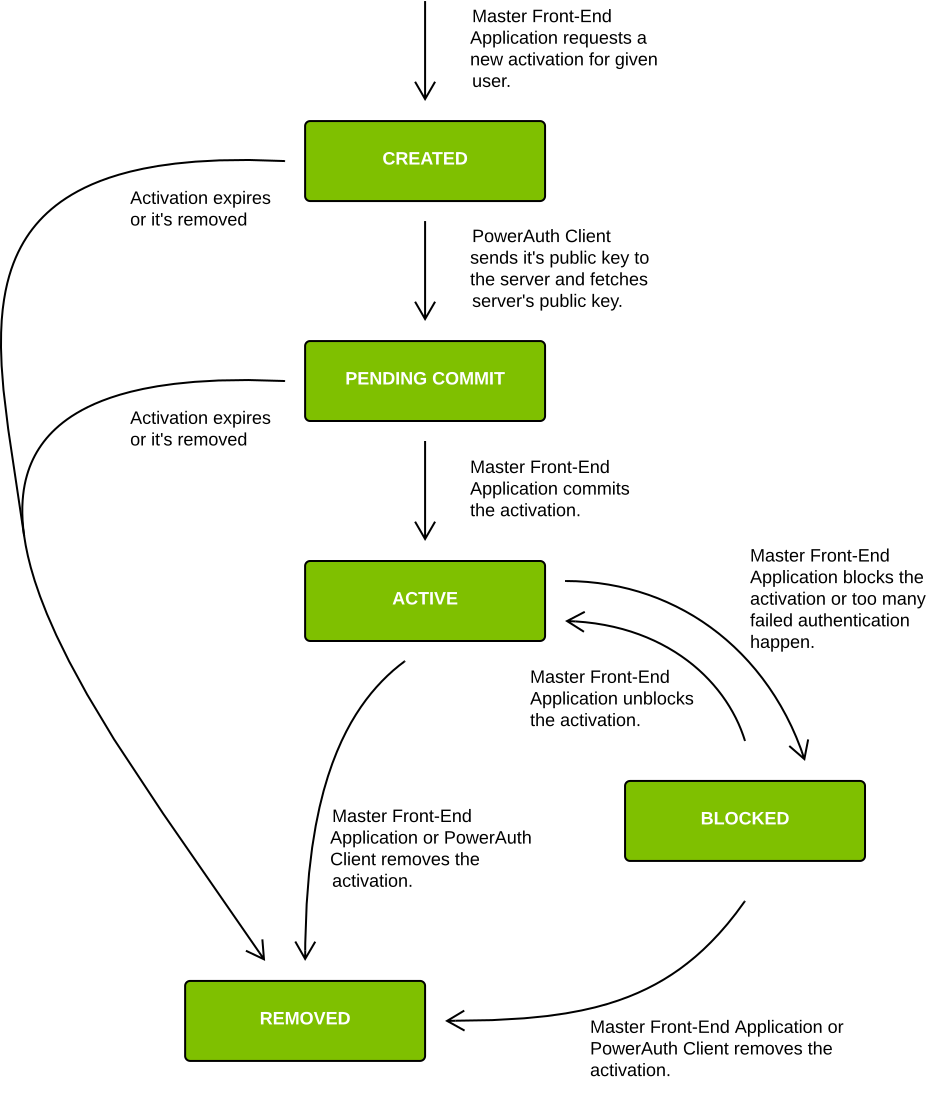
Device activation states represent the lifecycle of a mobile device activation within the system. Each state reflects the current status of the activation and determines which operations can be performed.
| State | Description |
|---|---|
CREATED |
The activation record is created using an external channel, such as the Internet banking, but the key exchange between the client and server did not happen yet. |
PENDING_COMMIT |
The activation record is created and key exchange between the client and server already took place, but the activation record needs additional approval before it can be used. |
ACTIVE |
The activation record is created and active. It is ready to be used for typical use-cases, such as generating authentication codes. |
BLOCKED |
The activation record is blocked and cannot be used for most of the use-cases, such as generating authentication codes. It can be unblocked and activated again. |
REMOVED |
The activation record is removed and permanently blocked. It cannot be used for generating authentication codes or ever unblocked. |
The application in ACTIVE state may not be confirmed by the mobile SDK yet.
The confirmation process is asynchronous and does not update the activation state, instead it updates
the confirmation_pending flag in the database and allows initial biometry setup.
For more information about activation blocking and removal please see the section Device Management.